
AutoCAD LT
A lower-cost, 2D-only edition of AutoCAD for drafting and documentation — best for small firms and individual professionals who don't need AutoCAD's full 3D toolset.
AutoCAD LT is Autodesk's 2D-only, lower-cost edition of AutoCAD, aimed at users who need professional 2D drafting and documentation without the 3D modeling, advanced automation (LISP) and network-licensing features of full AutoCAD. It uses the same native DWG format and a very similar interface to full AutoCAD, making it a common downgrade path for teams that don't need the 3D toolset.
It's the practical choice for 2D-only drafting work, with the price difference -- roughly a quarter of full AutoCAD's cost -- the main reason to choose it over the full product. At $45/month billed annually ($540/year), AutoCAD LT sits comfortably in the mid price band of this catalog, well below full AutoCAD's $175/month, making it one of the more accessible ways to get a professional, industry-standard drafting tool onto a desk.
Because AutoCAD LT shares the same DWG format as full AutoCAD, it slots cleanly into a mixed office where some staff need full 3D modeling and others only need to draft, annotate, and reference 2D documentation -- a firm can standardize its licensing tier by role rather than buying the most expensive seat for every user regardless of what they actually do day to day.
AutoCAD LT includes Smart Blocks search and convert tools and cloud/mobile access, per this catalog's compareFeatures, so despite being a stripped-down edition it isn't a legacy or feature-frozen product -- Autodesk continues to ship updates to LT alongside full AutoCAD, just without the 3D and automation layer that defines the higher-priced tier.
AutoCAD LT is also a common fit outside architecture and construction specifically -- facilities managers, MEP subcontractors doing 2D shop drawings, surveyors producing plats, and general drafting departments across manufacturing and civil engineering all use LT for the same reason AEC firms do: a genuine need for professional 2D DWG production without ever touching 3D geometry. That broader applicability is part of why LT has remained a stable, long-running product in Autodesk's lineup rather than a niche add-on.
One frequent point of comparison is between AutoCAD LT and free or lower-cost 2D CAD alternatives like DraftSight or LibreCAD -- LT's advantage in that comparison is less about raw feature count and more about guaranteed, pixel-perfect DWG fidelity with the broader AutoCAD ecosystem, since DWG is a proprietary Autodesk format and third-party tools sometimes introduce subtle compatibility issues on complex files that only show up later in a project.
The tradeoff is entirely and predictably about missing 3D and automation features: anyone who needs 3D modeling, LISP customization, or heavier third-party plugin support will outgrow LT and need to upgrade to full AutoCAD. That's a clean, well-understood upgrade path rather than a confusing feature matrix, since LT and full AutoCAD share the same underlying file format and much of the same interface.
Editor’s takeBIM•STACK editor's take: AutoCAD LT is a smart default for any role that's genuinely 2D-only -- drafters, reviewers, consultants who only need to reference or mark up drawings -- and the cost savings versus full AutoCAD add up quickly across a team of several such seats. The one thing to get right upfront is an honest assessment of who on the team will eventually need 3D: retrofitting that decision later means paying for an upgrade rather than planning the licensing mix correctly from day one. Firms that get this mix right -- full AutoCAD for the modelers and BIM coordinators, LT for everyone doing pure 2D production and review -- typically see the clearest return on the tiered pricing structure Autodesk has built around the two products.
Very short, especially for anyone who has used AutoCAD or a similar 2D CAD tool before -- the interface and hotkeys are intuitive, and it's well suited to beginners and to teams transitioning from older CAD versions. Because LT shares its interface and command structure with full AutoCAD, staff moving between the two tiers (say, a firm that upgrades one power user to full AutoCAD while keeping others on LT) face essentially no relearning curve.
For complete newcomers to CAD, the curve is still real but shallow relative to full BIM authoring platforms like Revit or Archicad -- 2D drafting concepts (layers, line weights, dimensioning, blocks) are more immediately intuitive for people coming from hand-drafting or general design backgrounds than parametric 3D modeling is, and LT's narrower feature set means there's simply less to learn before becoming productive.
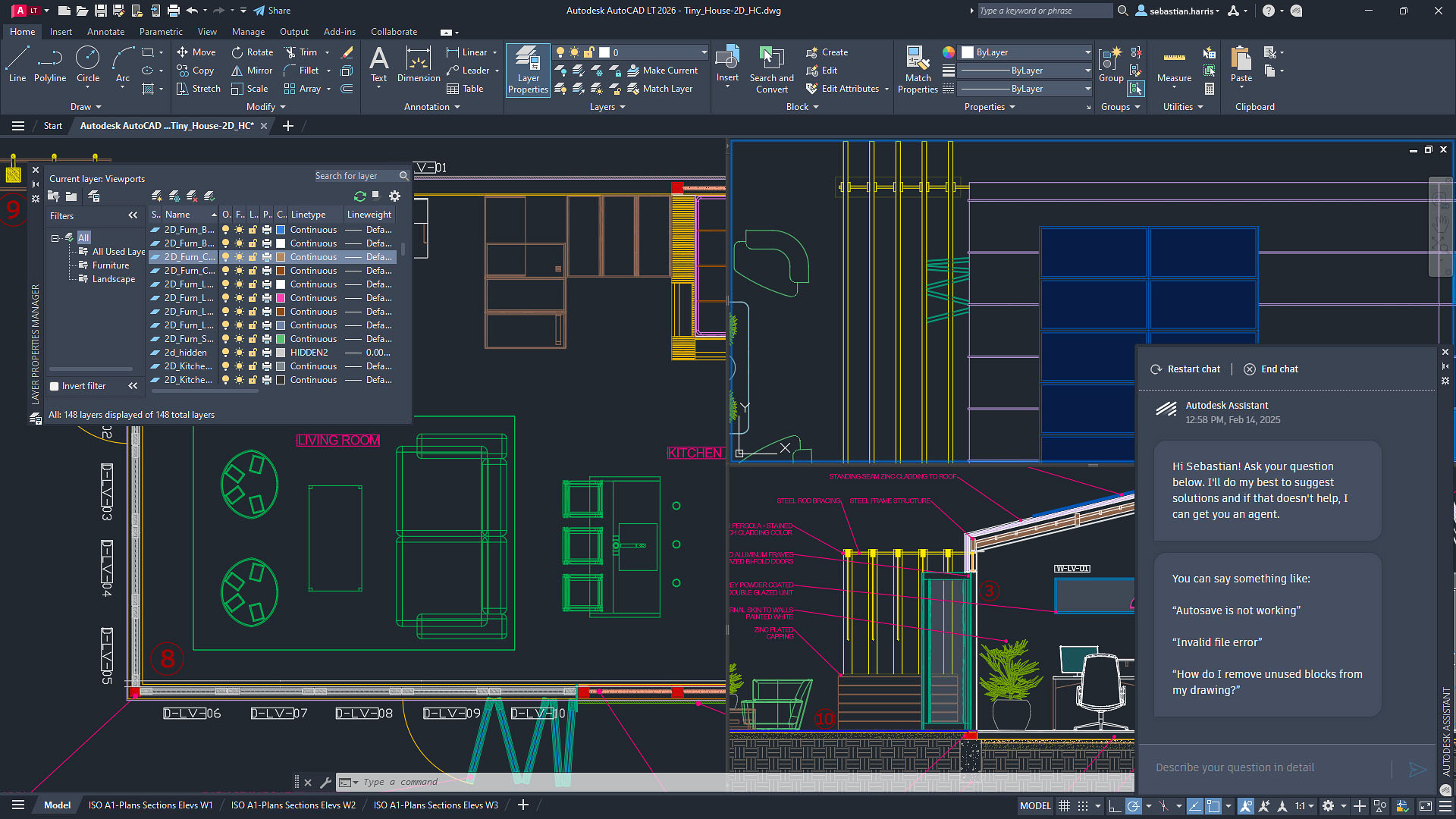
- Teams doing 2D-only drafting and documentationCovers the full 2D feature set of AutoCAD without paying for unused 3D capability.
- Users who mainly need read/reference access to DWG filesA lower-cost seat for team members who don't need full AutoCAD's advanced toolset.
- Small firms and individual practitioners on a budgetThe cost savings are the main draw for smaller operations.
- You need any 3D modelingThis is a hard limitation, not a workaround situation -- full AutoCAD or another 3D-capable CAD tool is required.
- You rely on AutoLISP scripts or heavy plugin customizationLT doesn't support AutoLISP -- confirm your existing automation workflows would still work before switching down from full AutoCAD.
- You need flexible floating/network licenses across a larger teamLT doesn't support network licensing the way full AutoCAD does.
What's the difference between AutoCAD and AutoCAD LT?
AutoCAD LT is 2D-only: it lacks 3D modeling, AutoLISP customization, network licensing and some third-party plugin support that full AutoCAD includes, at roughly a quarter of the cost.
Can AutoCAD LT open files from full AutoCAD?
Yes, both use the native DWG format, so files move between the two without conversion, though any 3D content won't be editable in LT.
Is AutoCAD LT good for beginners?
Yes -- its interface and hotkeys are intuitive, particularly for people newer to CAD or transitioning from older AutoCAD versions.
Does AutoCAD LT support plugins?
It has more limited third-party plugin support than full AutoCAD, and no AutoLISP customization support at all.
