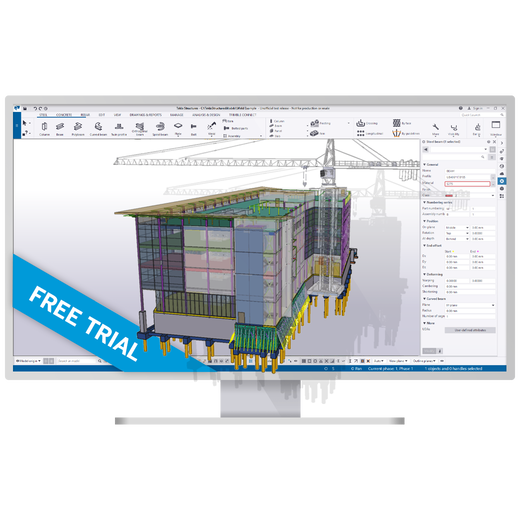
Tekla Structures (Trimble) is structural detailing and fabrication-modeling software focused on steel, concrete and precast construction, widely used by structural engineers, detailers and fabricators to produce fabrication-ready models and automated shop drawings rather than architectural design documentation. It supports large, multi-user models and is positioned toward large-scale commercial and industrial structural projects rather than small residential work.
Its core strengths are structural detailing depth, multi-user collaboration on large models, and clash detection ahead of fabrication -- catching conflicts on screen instead of on-site.
The tradeoffs are cost and complexity: Tekla is generally considered too expensive and too specialized for small-scale projects, and its modeling approach (surface-based rather than solid-based in places) takes real time to master.
Meaningfully steep, particularly its surface-based modeling approach for cuts and profiles, which behaves differently than the solid-modeling mental model many CAD users bring in.
Budget real training time before a team is detailing efficiently, especially for complex connections.
Key Features
✓Detailed Steel & Concrete BIM
✓Fabrication-Ready Models
✓Strong Structural Detailing
✓Automated Shop Drawings
✓Rebar Detailing
✓Multi-Material Structural Modeling
Pros
Deep structural detailing and fabrication toolsPurpose-built for steel and concrete detailing to a level of accuracy needed for direct fabrication, not just design representation.
Strong multi-user collaboration on large modelsSupports many simultaneous users working on a single large structural model.
Clash detection before fabricationCatches structural conflicts on screen before they become expensive on-site problems.
Automated shop drawing productionGenerates fabrication-ready shop drawings directly from the 3D model rather than requiring separate 2D drafting.
Runs on modest hardware relative to its capabilityDoesn't require top-end specs to run despite its modeling depth.
Cons
Expensive for small-scale projectsPriced and positioned for large-scale work, not small projects or small firms.
Real learning curveNot beginner-friendly, particularly around its surface-based (not solid-based) modeling approach for cuts and profile references.
Analysis workflow can feel like a black boxStructural analysis results can be harder to control toward expected engineering outcomes than dedicated analysis software.
Screenshots
🖼 Tekla Structures software interface, from tekla.com
Common Feature Checklist
Cloud / Web Access✓ Yes
Real-Time Collaboration✓ Yes
Mobile App✓ Yes
Free Educational License✓ Yes
Public API / Integrations✓ Yes
Best For
Structural detailers and fabricatorsThe core use case the software is built around -- fabrication-ready steel and concrete detailing.
Large-scale commercial/industrial structural projectsPositioned toward large projects, not small residential work.
Teams needing many simultaneous users on one modelStrong multi-user collaboration on large structural models.
Consider Alternatives If
You're working on small-scale structural projectsTekla's cost and complexity aren't usually justified for small jobs -- a lighter structural tool or Revit's structural toolset may fit better.
You need tight, predictable structural analysis workflowsDedicated analysis software like ETABS may integrate better with your review process.
Your team needs a shorter onboarding timeThe surface-based modeling approach has a real learning curve -- confirm your team has training time budgeted before committing.
Frequently Asked Questions
Is Tekla Structures only for steel?
No, it handles both steel and concrete/precast structural detailing, though it's especially well known for steel fabrication modeling.
How much does Tekla Structures cost?
Trimble doesn't publish list pricing -- you'll need to contact Trimble directly or an authorized reseller for a quote.
Is Tekla Structures hard to learn?
There's a real learning curve, particularly its surface-based modeling approach for cuts and profile references, which differs from solid-modeling CAD conventions.
Is Tekla worth it for small projects?
Generally no -- it's priced and built for large-scale commercial/industrial structural work, and its cost isn't usually justified for small jobs.
Used By
Extracted from tekla.com or confirmed directly by the firm -- not independently verified by BIM•STACK beyond that.
Pricing found on Tekla's own site in September 2026. Software pricing changes often — always confirm the current price on the vendor's site before buying.
Score Profile Prototype
Price3/10Contact-sales pricing defaults to the "high" price band in this catalog — draft estimate.
Learning Curve3.5/10A specialized structural detailing tool with a steep learning curve — draft estimate.
IFC / openBIM7.5/10Strong, long-established IFC/openBIM support for structural workflows — draft estimate.
Collaboration5.5/10Trimble Connect integration supports model sharing — draft estimate.
Performance6/10Handles large structural models but can be resource-heavy — draft estimate.
This is a prototype, not a published score. Only the Price axis is derived from a verified catalog field (priceBand); the other axes are draft editorial estimates awaiting vendor/third-party sourcing before this ships publicly.