Autodesk Forma
Autodesk's unified AECO cloud platform — spans early site analysis and schematic building design through to construction document management, model coordination and field issue tracking (the former Autodesk Construction Cloud, renamed into the Forma brand in March 2026).
Autodesk Forma has grown into a single brand spanning the entire building lifecycle Autodesk sells. Forma Site Design covers massing, solar/wind exposure and zoning feasibility; Forma Building Design adds schematic-level building modeling with integrated performance analysis; and as of March 2026, Autodesk also folded the former Autodesk Construction Cloud (ACC) into the same brand, so 'Forma' now also covers document management (Forma Data Management, formerly Autodesk Docs), model coordination, field issue tracking, RFIs, submittals and cost management -- the ACC mobile app is now the Autodesk Forma app too. Existing ACC projects, data and workflows carried over unchanged; it was a naming change, not a platform replacement, and ACC itself had been the successor to and eventual replacement for BIM 360 for most Autodesk construction customers.
In practice, Forma now spans early site feasibility, schematic building design, and construction-phase coordination and field management, sold as Forma for Buildings, as part of a Revit subscription, or bundled into the Architecture, Engineering & Construction (AEC) Collection. On the design side, that positions Forma as a direct alternative path into early building design, running alongside -- and increasingly overlapping with -- Revit itself, with a direct hand-off into Revit for detailed BIM authoring once a scheme is validated. On the construction side, it's widely deployed among general contractors and owners already inside the Autodesk ecosystem, built around a mobile field app and a breadth of integrated modules (Forms, Issues, RFIs, Submittals, Meetings) so one login covers most of the coordination work that used to require several disconnected tools.
Editor’s takeThe BIM•STACK editor uses Forma daily and considers its real-time collaboration mechanism genuinely excellent: multiple people can work on the same site and building model at once, previous versions are easy to recover if a study goes in the wrong direction, and connecting consultants into the same model directly, without exporting and re-sending files back and forth, has measurably sped up early-stage coordination.
The honest downside from that same day-to-day use: Forma has grown a lot of parallel, overlapping features for similar analyses -- and now overlapping design tools between Site Design, Building Design and Revit itself -- which can genuinely confuse users trying to figure out which tool applies to their situation, and the documentation hasn't kept pace with the expanding feature set. On the construction side inherited from ACC, the platform's breadth means a real onboarding investment, and it can slow down on large models, big document sets, or unreliable job-site internet -- a real constraint for a tool meant to be used from the field.
The core massing and analysis workflow is approachable quickly, but the overlapping/parallel features mentioned above mean new users benefit from someone experienced showing them which tool to use for which task, since the documentation alone doesn't fully cover it.
The construction-management side inherited from ACC has its own, separate learning curve -- meaningful, since the platform's breadth requires real training and onboarding time before a team is using it efficiently. Teams already using other Autodesk products tend to ramp up faster since the interface conventions and account structure carry over.
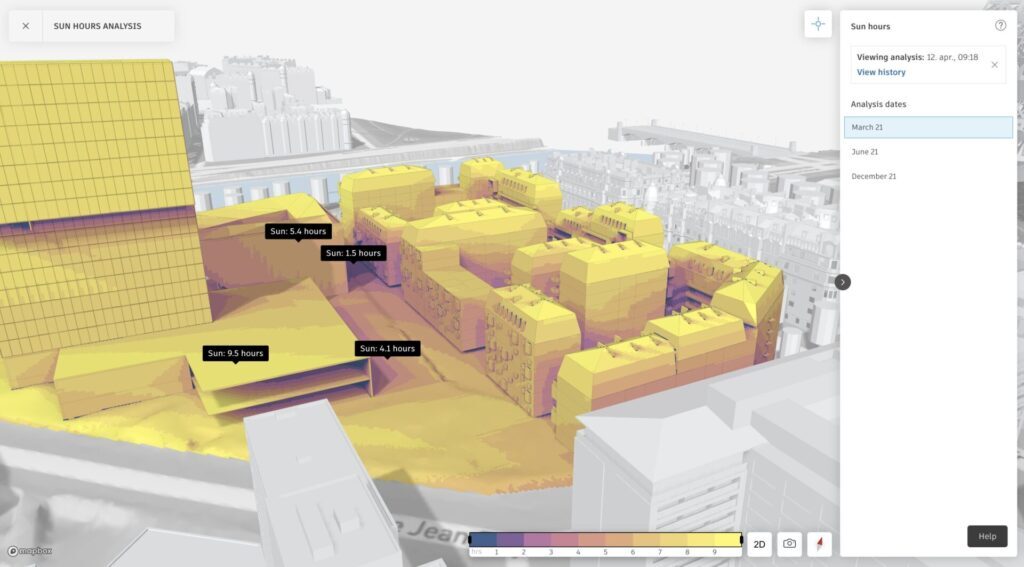
- Early-stage site feasibility and massing studiesThe original use case Forma is built around, before committing to detailed BIM authoring.
- Teams doing schematic building design before RevitForma Building Design lets teams shape and analyze a building at the schematic level in the browser before moving into Revit for construction documentation.
- Teams coordinating with outside consultants earlyDirect consultant access to the same model is a genuine time-saver during early design.
- Firms already on a Revit subscription or the AEC CollectionSince Forma now comes bundled with those licenses, there's little reason not to use it once a firm already has access.
- General contractors managing multiple active projectsThe modular construction-side structure (Docs, Build, Cost) covers a full project lifecycle without stitching together separate tools.
- Field teams needing mobile-first coordinationThe mobile app is specifically built for site engineers reviewing issues and RFIs in the field.
- You want a simpler, single-purpose feasibility toolTestFit is more narrowly focused on feasibility/massing and may feel less overwhelming for that specific task alone.
- You need thorough documentation to self-train a teamBudget for hands-on onboarding rather than expecting the documentation to cover every feature on its own.
- You want to stay entirely inside one modeling environmentTeams who prefer keeping schematic and detailed design in Revit alone, rather than splitting work across Forma and Revit, may find the single-tool workflow simpler.
- You need something simpler for a small construction teamSmaller, more focused tools like Buildertrend may suit small residential/remodeling contractors better than Forma's full enterprise breadth on the construction side.
- Reliable offline/low-connectivity field use is criticalThe construction-side tools' cloud dependence can cause friction on unreliable job-site internet -- worth testing connectivity-heavy workflows before committing.
Does Autodesk Forma integrate with Revit?
Yes, it's built for a direct hand-off -- a validated early-stage concept moves into Revit for detailed design.
Is Forma a replacement for Revit?
Not entirely -- Forma Building Design now covers schematic-level building design and analysis, but detailed BIM authoring and construction documentation still happen in Revit. The two are increasingly complementary, with some overlap at the schematic stage.
How is Autodesk Forma priced?
Forma is most commonly accessed through Autodesk's AEC Collection (around $307/mo billed annually) or included with a Revit subscription; it's also available as its own Forma for Buildings plan.
Can multiple people work in Forma at once?
Yes, real-time multi-user collaboration is one of its strongest features, including the ability to recover previous versions of the model.
Is Autodesk Forma hard to learn?
The core design workflow is approachable, but the platform has enough overlapping/parallel tools for similar analyses that new users benefit from guidance beyond the available documentation -- and the construction side inherited from ACC has its own separate onboarding curve given its breadth of modules.
Can consultants access the same Forma model directly?
Yes -- consultants can be brought into the same model directly rather than exporting and re-sending files, which speeds up early coordination.
Is Autodesk Forma the same as Autodesk Construction Cloud (ACC)?
Yes -- since March 2026, Autodesk Construction Cloud has been folded into the Autodesk Forma brand. It's the same construction/coordination platform under a new name, not a different product: Autodesk Docs became Forma Data Management, and the ACC mobile app is now the Autodesk Forma app. Existing ACC projects and data carried over unchanged.
What's included in the construction side of Forma (formerly ACC)?
The former ACC product family -- Docs (document management), Build (field management, RFIs, submittals), Cost (budgeting/cost management) and BIM Collaborate (model coordination) -- all now live under the Forma brand.
Does Forma's construction side work well in the field with poor internet?
It can face performance issues in low-connectivity environments since it's a cloud-based platform -- test this against your specific job-site conditions.