
Bluebeam Revu
PDF markup, takeoff and collaboration software widely used for construction document review and estimating.
Bluebeam Revu is PDF markup, takeoff, and collaboration software built specifically for the construction and design industry, rather than a general-purpose PDF editor adapted for it. Bluebeam LLC was founded in 2002 and joined the Nemetschek Group in 2014 -- the same parent company behind Graphisoft's Archicad -- giving it access to a broader AEC software ecosystem. Bluebeam now reports over 4 million users in more than 160 countries.
The core of Revu is document review: marking up construction drawings and specs, measuring quantities directly off a PDF for estimating, and comparing drawing revisions to catch changes. Its cloud-based Bluebeam Studio adds real-time, multi-user collaboration on the same set of documents -- Studio and the markup tools are consistently named as the software's strongest features.
Bluebeam has a strong reputation across a wide range of company sizes, from small firms (11-50 employees) up through 1,000+ employee organizations -- a wider size range than most BIM authoring tools, reflecting how central PDF review and takeoff are to construction workflows regardless of company size. Its user base skews construction-heavy, followed by architecture & planning, engineering, and real estate.
Bluebeam is priced and packaged in tiers (Basics, Core, Complete, Max) rather than a single SKU, with more advanced measurement, automation, and now AI-assisted review tools reserved for the higher tiers -- a structure that lets small firms buy in cheaply while giving larger ones a path to the automation features they actually use daily.
Editor’s takeThe BIM•STACK editor recommends Bluebeam as a solid, reliable tool -- markup, takeoff and Studio collaboration all work exactly as advertised, day to day. The main knock against it is simply the sheer number of tools and options packed into the interface, which can take a while to feel fully comfortable navigating even after the core workflow clicks.
There's a real but manageable learning curve: the interface itself is user-friendly for core markup and review tasks, but the sheer number of features can feel overwhelming at first, and some keyboard shortcuts are unwieldy.
The curve is steeper for the deeper toolset -- takeoff workflows, batch automation (Complete plan and above), and the newer AI-assisted review tools (Max plan) all require more ramp-up than the basic markup tools most new users start with.
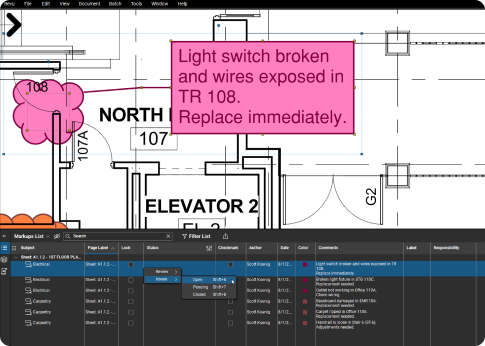
- Construction teams doing document review and takeoffIts core user base is predominantly construction, followed by architecture & planning and engineering -- Revu is built around this exact workflow.
- Distributed teams needing real-time markup collaborationBluebeam Studio is repeatedly effective for teams coordinating across multiple offices or job sites.
- Firms of any size, not just large onesCompany sizes using Bluebeam range from 11-50 employees up to 1,000+, wider than most BIM-specific tools.
- Teams that want takeoff and markup in one subscriptionNot needing a separate takeoff tool alongside a separate PDF editor is a genuine time and cost saver.
- You only need basic PDF editing, not construction-specific toolsGeneral-purpose PDF software like Adobe Acrobat is cheaper if you don't need takeoff, drawing-set comparison, or construction markup sets.
- Cost is the deciding factor and you don't need the advanced tiersBluebeam can feel pricey for a PDF editor -- worth confirming which tier (Basics vs Core vs Complete vs Max) you actually need before buying.
- You're already standardized on a different construction platform's document toolsIf your team already runs document review and field markup inside Procore or Autodesk's construction platform (now under the Autodesk Forma brand), adding a separate Bluebeam subscription may duplicate functionality you're paying for elsewhere.
- Takeoff is your primary use case, not markupDedicated takeoff/estimating software such as STACK or PlanSwift may fit better if quantity takeoff -- not document markup -- is the main job.
How much does Bluebeam Revu cost?
Bluebeam sells Revu in four annually-billed tiers: Basics ($260/user/yr), Core ($330/user/yr), Complete ($440/user/yr), and Max ($590/user/yr, introductory pricing), each adding more advanced measurement, automation, and AI-assisted review tools than the last.
Is Bluebeam Revu good for construction takeoffs?
Yes -- it combines Adobe-like PDF editing with dedicated takeoff software, letting users measure quantities directly off PDF drawings. Some do flag the takeoff tools specifically as more cumbersome than the core markup tools.
What is Bluebeam Studio?
Studio is Bluebeam's cloud-based real-time collaboration feature, letting multiple people mark up and review the same set of documents simultaneously from different locations. It's one of the most consistently praised features of the platform.
Is Bluebeam Revu hard to learn?
The core markup interface is user-friendly, but the full feature set can feel overwhelming at first, and some keyboard shortcuts are considered cumbersome. The deeper automation and takeoff tools take longer to master than basic markup.
Who owns Bluebeam?
Bluebeam LLC, founded in 2002, has been part of the Nemetschek Group since 2014 -- the same parent company as Graphisoft (Archicad), giving it ties to a broader AEC software portfolio.
Does Bluebeam Revu have a free trial?
Yes, Bluebeam offers a free trial directly from its own site (bluebeam.com/trials/) so you can test the markup and collaboration tools before choosing a plan tier.