Bonsai
Free, open-source OpenBIM add-on for Blender (formerly BlenderBIM), built on the IfcOpenShell library for native IFC authoring.
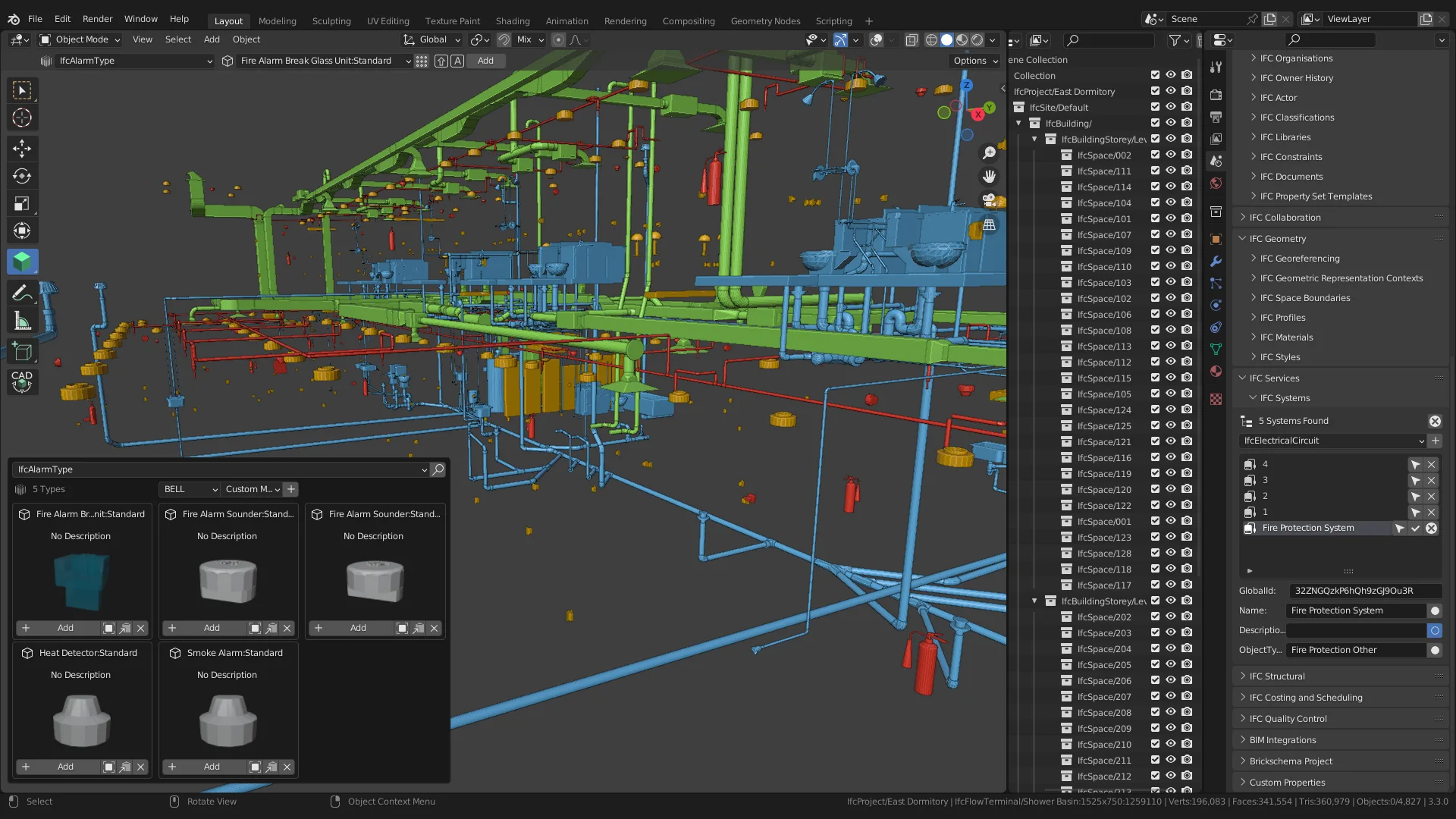
Bonsai is a free, open-source add-on for Blender that turns it into a native IFC authoring tool -- every operation reads and writes IFC data structures directly, rather than modeling in a proprietary format and exporting to IFC as a translation step. It's built on IfcOpenShell, the open-source IFC library that also powers the tool's geometry engine.
The project started as "BlenderBIM," led by Dion Moult, and was renamed to Bonsai in August 2024 -- not a rebrand for marketing reasons, but a genuine trademark constraint: "OpenBIM" is a buildingSMART trademark, and other candidate names were already registered elsewhere. It's not a company; it's a volunteer open-source project with roughly 195 contributors, sustained through Open Collective donations ($95K+ raised) rather than software sales.
Features span the full BIM lifecycle: IFC authoring and viewing, 2D drawing generation from the 3D model, structural and MEP systems, costing and 4D scheduling, facility management with live sensor data, clash detection, and support for IDS v1.0 and BCF v3. Bonsai is GPL-3.0 licensed; the IfcOpenShell core is LGPL-3.0.
Adoption evidence is real but modest: Euskal Trenbide Sarea, the Basque public railway agency in Spain, has published its own IFC/Bonsai usage manuals -- a genuine public-sector reference, though not a formal case-study page on Bonsai's own site. The GitHub repo (IfcOpenShell/IfcOpenShell) has around 2,800 stars, and the community lives on the OSArch forum rather than a vendor support channel.
Editor’s takeBIM•STACK editor's take: Bonsai is the most credible free, open-source path to native IFC authoring available today, and its trademark-driven rename doesn't change what's a genuinely capable, actively developed tool. The honest tradeoff is support: there's no vendor to call, only a volunteer community and donation-funded development, so firms should weigh that against Bonsai's zero licensing cost.
Bonsai's learning curve has two layers: Blender's own interface, which is unfamiliar to architects coming from Revit or Archicad, and IFC/BIM concepts layered on top. Users already comfortable in Blender for other modeling work will ramp up faster than complete newcomers to both Blender and BIM simultaneously. The OSArch community forum and Bonsai's own documentation are the primary support paths, since there's no vendor training program to fall back on.
- Budget-constrained firms and individuals wanting native IFC authoringZero licensing cost makes it accessible where Revit or Archicad's subscription cost is prohibitive.
- Teams already comfortable in BlenderExisting Blender familiarity removes half of the tool's learning curve.
- OpenBIM-committed practices and public-sector agenciesNative IFC and IDS/BCF support suit organizations mandating open, vendor-neutral data formats.
- Contributors and developers wanting to shape the roadmapAs an open-source project, firms with development capacity can contribute features directly rather than waiting on a vendor roadmap.
- You need dedicated vendor support and an SLAArchicad, Revit or Vectorworks offer commercial support that a volunteer open-source project cannot.
- Your team has no Blender experience and wants a purpose-built BIM interfaceArchicad or Revit are built specifically for architectural workflows rather than adapted from a general 3D tool.
- You need a large, proven ecosystem of third-party pluginsRevit's plugin marketplace is far larger than Bonsai's current add-on ecosystem.
Is Bonsai really free?
Yes -- Bonsai is GPL-3.0 licensed, free and open source, sustained by Open Collective donations rather than software sales.
What was Bonsai called before?
BlenderBIM. It was renamed to Bonsai in August 2024 due to trademark constraints on other candidate names.
Who develops Bonsai?
It's a volunteer open-source project led by Dion Moult, built on the IfcOpenShell library, with around 195 contributors.
Does Bonsai require Blender experience?
It helps -- Bonsai is a Blender add-on, so users unfamiliar with Blender face both a Blender and a BIM/IFC learning curve simultaneously.
Who actually uses Bonsai?
Euskal Trenbide Sarea, a Basque public railway agency in Spain, has published its own Bonsai usage manuals -- the most concrete public adoption evidence available.

