
Check Aaron
Invitation-only private beta: ask questions about your IFC model, PDF drawing sets and cost tables, with every figure computed by code and each claim checked by up to five other AIs.
Check Aaron is an AI question-answering workspace for building projects: you upload an IFC model, the project's PDF drawing sets and specifications, and cost or code tables, then ask questions in plain language -- counts, areas, quantities by material, facades by orientation, structure, MEP, quality checks, or anything those tables hold. Each answer opens with the conclusion, followed by a table with the figures behind it, a text diagram of what was analysed, and the key claims, each checked by other AI models.
Its central design decision is a division of labor between code and AI. Check Aaron computes every area, length, volume and total from your files with ordinary code, and the AI model only reads the finished tables and writes the answer. The company's pitch is that this keeps figures exact (the AI is never asked to add up thousands of rows) and keeps the AI's input small, because it reads a result rather than your whole project. A first planning step picks only the categories, properties and sheets a question points to, so element data and entire drawing sets stay out unless a question names them.
The second pillar is auditability. Every claim in an answer is meant to be one click from its source: its table, its element in the 3D model, or its sheet in the PDF set. When the 3D model and the drawings disagree, the answer shows both values and says which looks out of date rather than settling the conflict silently. Up to five other AI models can then check each claim, and the interface only raises a flag when a claim needs a second look. You can use the AI models included in your plan or connect your own AI account (OpenRouter by one-click sign-in, or an API key for OpenAI, Anthropic, xAI, Google or Perplexity) and pay that provider directly.
The workspace itself is more than a chat box. The 3D tab opens IFC2x3, IFC4 and IFC4.3 models in the browser with category filters, a section cut, perspective or axonometric projection, a measuring tool that snaps to corners, and the ability to overlay several models of one project (architecture, structure, MEP). The Documents tab is a PDF viewer with scale calibration, length, polylength, area and count measurements, markup tools (clouds, callouts, notes, pen, highlighter) and an eyedropper that measures areas by material from a drawing's legend. Cost, zoning and code tables become light, data-only 'repositories' that can be linked to elements in the model, so a cost question crosses your prices with the model's quantities.
Check Aaron is in private beta. The company states it is not open to the public yet and that accounts are by invitation only; invited accounts currently use the Build plan at no charge. A public pricing page was not available when this review was written, so there is no published price to quote. Plans are described as a subscription rather than a meter -- you see how much of the month you have used, never a bill per question -- and the Build and Crew plans can create API keys and use an MCP server so other apps and AI assistants can query your own projects.
Editor’s takeBIM•STACK editor's take: Check Aaron is one of the most interesting emerging technologies in this catalog. Its design -- figures computed by code, claims checked by other AIs, every answer traceable to its element or sheet -- promises a lot for a low cost. It is still a private beta, so treat it as an early-stage technology to watch rather than a proven platform to build a firm's workflow around.
Disclosure: Check Aaron is built by the founder of BIM•STACK. This review is written from the product's own website and documentation, not from independent testing, and it is not yet open to the public, so treat the feature claims below as the vendor's description until you have seen them on your own files.
The basic loop is short: sign in, create a project, add an IFC model, PDFs or both (a project can be PDFs alone), open the Chat tab and ask a question. Files are read in your browser, and the project keeps the file and what was read from it so you can reopen it later.
The deeper tools take more learning. The PDF viewer has a full tool rail with keyboard shortcuts (for example L for length, A for area, N for count, K to calibrate against a known dimension), and getting reliable measurements depends on setting each sheet's scale first. Cost repositories also need setup: importing a table, opening it in the project, then linking products to elements in 3D or letting Check Aaron match them.
Choosing how hard the AI works (Fast, Balanced or Thorough) and deciding which checker models to add are optional controls rather than required steps, so a first-time user can ask questions without configuring anything.
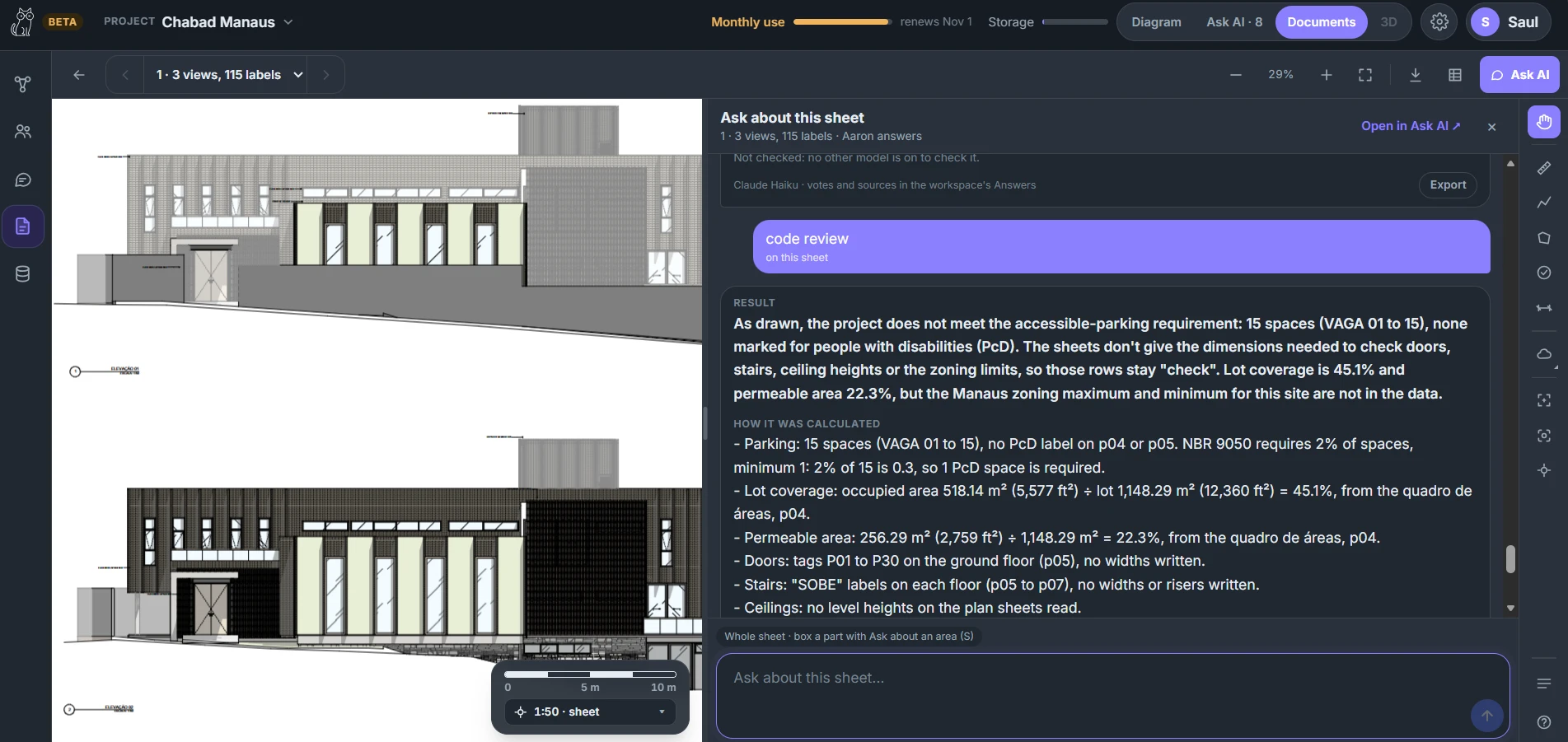
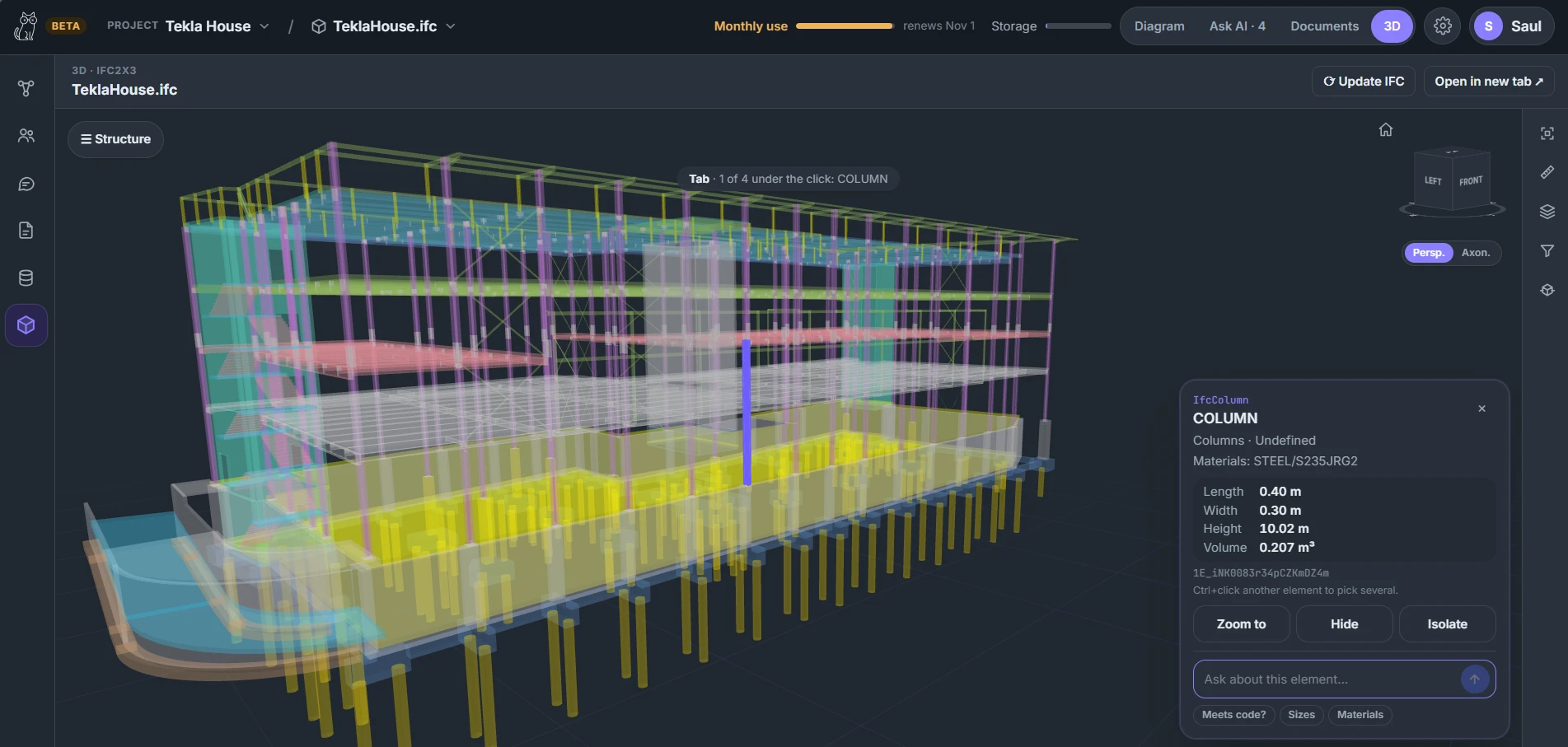
- Estimators and project managers who need quantities and answers with sourcesQuantity questions are computed from the IFC's quantity sets and every figure points back to its element, which suits anyone who has to defend a number.
- Teams reconciling a 3D model against the drawing setConflicts between model and sheets are shown rather than silently resolved, which is useful during coordination.
- Firms that want to use their own AI subscriptionsConnecting an existing AI account means usage is billed by that provider and is not capped by the monthly allowance.
- You need rule-based, repeatable IFC model checkingSolibri runs custom rule sets against IFC models for clashes, standards and data completeness, with deterministic results rather than AI-written answers.
- You want AI agents across contracts, specs, drawings and correspondence, available todayNomic deploys AI agents across project documents, including code compliance checking, and offers a free tier rather than invitation-only access.
- You want an AI assistant to drive your existing authoring toolsArchi Automate connects Claude, GPT, Gemini or any MCP client to Revit, Archicad, Vectorworks, Rhino, AutoCAD and other desktop apps through their native APIs.
What is Check Aaron?
An AI workspace that answers questions about your building project from your own IFC model, PDF drawing sets and cost or code tables, with figures computed by code and each claim checked by other AI models.
Can I use Check Aaron today?
Not openly. The company says it is in private beta and accounts are by invitation only; invited accounts use the Build plan at no charge during the beta.
How much does Check Aaron cost?
No public price was available when this review was written. Plans are described as a subscription rather than a per-question meter, and invited beta accounts currently use the Build plan at no charge.
Which file types does it read?
IFC models (IFC2x3, IFC4 and IFC4.3) and PDFs, including drawing sets and specifications, plus cost tables as spreadsheets, PDF tables or live Google Sheets, and zoning and code chapters.
Does the AI do the calculations?
No. Check Aaron computes areas, lengths, volumes and totals from your files in code, and the AI only reads the finished tables and writes the answer.
Can I use my own AI account?
Yes. You can connect OpenRouter with one click, or paste an API key for OpenAI, Anthropic, xAI, Google or Perplexity, and pay that provider directly. Questions on your own account are not limited by the monthly allowance.
What happens to my files?
Files are read in your browser and kept for you; only the figures a question needs go to the AI models answering and checking it. The company states your data is never sold or used to train AI models, and you can delete projects, models, documents, keys and your account at any time.
Does it connect to other apps?
The Build and Crew plans can create API keys and use an MCP server so other apps and AI assistants can list your projects, read a model's overview, ask questions and search your repositories using your own account.