D5 Render
Real-time ray-tracing rendering software for architecture with built-in AI-assisted tools, usable standalone or as a live-sync plugin inside SketchUp, Revit, Archicad, Rhino, 3ds Max, Cinema 4D, Blender and Vectorworks.
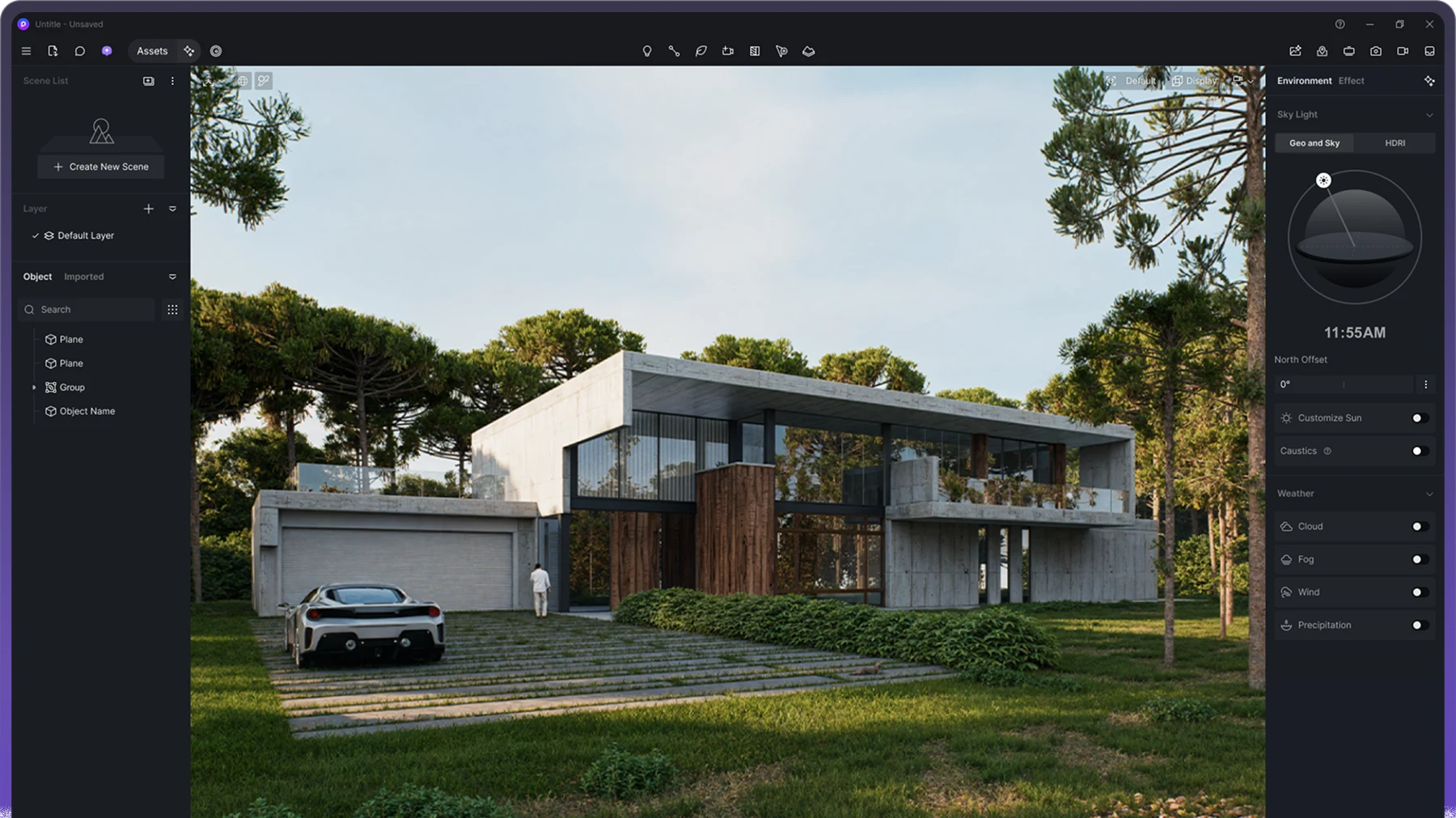
D5 Render is real-time ray-tracing visualization software for architecture, interior and landscape design, made by Dimension 5 Techs (branded D5), on the market since 2020. The D5 product family spans three related tools under one subscription structure: D5 Render (the full real-time rendering application), D5 Lite (an AI-native visualization plugin), and D5 Works (a curated asset marketplace).
Despite being one of the more AI-forward tools in this catalog's rendering category, D5 Render is still, at its core, a plugin-based renderer in the same tradition as Enscape or V-Ray -- it ships with live-sync integrations for eight major modeling and DCC applications (SketchUp, 3ds Max, Rhino, Revit, Archicad, Cinema 4D, Blender and Vectorworks), so a scene stays synced with the source model rather than needing a manual export/import round trip every time a design changes. That's a meaningfully different setup than a standalone AI image generator with no direct model connection -- D5 sits inside a firm's existing modeling workflow rather than replacing it.
D5's AI feature set includes more than 10 built-in AI tools (unlimited use on Pro and above), a city generator with Cesium integration for large-scale urban context, VR/XR walkthroughs, and output up to 16K still images and 8K video on the Teams tier. A LiveSync workflow keeps the renderer synced with common modeling tools rather than requiring a manual export/import round trip each time.
D5 Works, the asset marketplace component of the product family, is worth understanding as its own piece: rather than requiring users to source 3D models, materials and entourage (people, vegetation, vehicles) from scattered third-party sites, D5 Works curates a library directly accessible from inside the renderer, so populating a scene with realistic context doesn't require leaving the application or manually converting file formats between different asset sources.
Unlike many rendering tools that gate meaningful use behind a time-limited trial, D5's Community tier is a permanent free plan with unlimited projects -- AI features are capped at 50 trial credits, but the core rendering, environment and landscaping tools are available indefinitely at no cost.
D5's own site names a genuinely credible customer roster for a company only five years old: BIG (Bjarke Ingels Group), KPF, AECOM, Aedas, Zaha Hadid Architects, NBBJ, SWA Group and Populous -- a mix of globally recognized architecture, engineering and landscape firms that suggests real adoption at large-firm scale, not just among individual freelancers and small studios.
D5's own marketing draws direct comparisons against Lumion specifically, one of the longest-established names in real-time architectural rendering -- positioning D5 as matching or exceeding Lumion's image quality while adding a considerably deeper built-in AI toolset and a genuinely permanent free tier, rather than Lumion's time-limited trial model. That's a meaningful competitive claim worth verifying on a firm's own representative scenes rather than taking at face value, but it does signal which specific competitor D5 sees as its closest point of comparison in the market.
Editor’s takeBIM•STACK editor's take: D5 Render earns a genuinely strong position in the real-time rendering category by combining Enscape/Lumion-style live-sync plugin workflows with a more aggressive, unlimited-on-Pro AI feature set at a lower entry price than most established competitors -- and its named customer list (BIG, AECOM, ZHA) is a real, verifiable signal that large firms are using it in production, not just evaluating it. The honest caveat is that D5 is newer to the category than Enscape or V-Ray specifically, so firms with deep existing investment in either of those ecosystems should weigh switching costs against D5's lower price and broader AI toolset before moving.
Built around a familiar real-time-preview workflow similar to Enscape or Lumion, making it approachable for anyone already used to that category of tool -- generally faster to learn than offline renderers like V-Ray, since changes appear instantly rather than requiring a render pass.
Because D5 installs as a live-sync plugin inside a firm's existing modeling tool (Revit, SketchUp, Archicad and the rest) rather than requiring a separate standalone workflow, most of the ramp-up time goes into learning D5's own rendering/lighting/material controls specifically, not into learning a new modeling paradigm -- teams already comfortable with any real-time renderer's general interaction model (live camera navigation, material swapping, lighting presets) transfer that intuition directly.
- Firms wanting real-time visualization with AI tools includedThe core value proposition -- speed plus built-in AI assistance -- at a lower price than category peers.
- Teams that want to test extensively before payingThe permanent free Community tier allows real evaluation, not just a time-boxed trial.
- Firms needing large-scale urban or city-context rendersThe city generator and Cesium integration are built specifically for this.
- Firms already working in one of D5's 8 supported host appsLive-sync plugin support means no separate export step disrupts an existing SketchUp/Revit/Archicad/Rhino workflow.
- You need the most mature third-party plugin ecosystemEnscape and V-Ray have longer track records and broader third-party material/asset support.
- You need offline, maximum-fidelity rendering over real-time speedV-Ray remains the reference point for offline rendering fidelity.
- Multi-user real-time collaboration is a day-one requirementBudget directly for the Teams tier rather than starting on Pro and upgrading later.
Is D5 Render free?
Yes -- the Community tier is a permanent free plan with unlimited projects, though AI features are limited to 50 trial credits.
What's the difference between D5 Render, D5 Lite and D5 Works?
D5 Render is the full real-time rendering application, D5 Lite is an AI-native visualization plugin, and D5 Works is a curated asset marketplace -- all part of the same product family.
How much does D5 Render cost?
Pro starts at $30/month ($360/year), Teams runs $59/month per seat ($708/year), and Enterprise is custom-priced.
Does D5 Render support VR?
Yes -- VR walkthroughs and XR tours are available on paid tiers.
Is D5 Render a plugin or a standalone app?
Both -- it runs as a live-sync plugin inside SketchUp, 3ds Max, Rhino, Revit, Archicad, Cinema 4D, Blender or Vectorworks, keeping the render synced with the source model.
Who uses D5 Render?
Named customers on d5render.com include BIG (Bjarke Ingels Group), KPF, AECOM, Aedas, Zaha Hadid Architects, NBBJ, SWA Group and Populous.