Cloud space-planning platform that generates and compares building layout options with automatic clearance checking, then hands off to Revit — pivoted from its original code-first generative-design roots in 2024/2025.
Hypar was founded in 2018 by Anthony Hauck, who previously led Revit's product development and Autodesk's generative-design initiatives, and Ian Keough, creator of Dynamo, the visual-programming platform for Revit -- serious pedigree in computational design, based in Culver City, California.
The product has changed substantially since launch. Hypar originally shipped as a code-first generative-design sandbox aimed at scripters, generating system-level design applications and layouts exportable to Revit. In 2023 it added a ChatGPT-based front end for text-to-BIM generation, demonstrated publicly with DPR Construction. By late 2024 into 2025, Hypar rebuilt its entire interface specifically around space planning, becoming a cloud tool aimed at non-programmers rather than the original scripting sandbox -- a genuinely different product today from what its name may still evoke to anyone who tried it years ago.
Today's workflow: import a site, floor plan and program (via DWG, laser scans, DXF, images, PDFs, or an XLS/CSV program list), generate and compare layout options with automatic clearance and clash checking, then hand the approved layout to Revit.
The current interface is deliberately built for non-programmers, a real simplification from Hypar's original code-first, scripting-oriented design. The free Personal tier lets new users test the core space-planning workflow -- importing a site and program, generating layouts -- before a firm commits to a paid tier.
Key Features
✓AI-assisted space planning and layout generation
✓Automatic clearance and clash checking
✓CAD (DWG/DXF), laser-scan and program (XLS/CSV) import
✓Direct export to Revit
Pros
Serious founding pedigreeCo-founded by Revit's former product-development lead and the creator of Dynamo.
Genuine free Personal tierNo card required, aimed at students and evaluation, with a real working version of the core space-planning tool.
Automatic clearance and clash flaggingThe Professional tier flags clearance conflicts as you draw, catching issues early rather than late in BIM.
Direct CAD import/export plus Revit hand-offImports DWG/DXF and exports back to CAD or directly into Revit once a layout is approved.
AI layout assistance on paid tiersAI layout suggestions and an 'ask AI to edit your model' feature speed up iteration.
Real onboarding on the Studio tierFirms standardizing on Hypar get a pilot, SSO, training and a named support contact.
Cons
The product has pivoted substantially since launchPast impressions of Hypar as a code-first scripting sandbox may no longer describe the current space-planning-focused tool.
Free tier is cappedPersonal limits to 3 projects and 1 design option, and requires measuring clearances manually rather than automatically.
Per-user pricing adds up for larger teamsProfessional runs $100/user/month before Studio's volume pricing becomes relevant.
Enterprise features require a sales conversationSSO, onboarding and dedicated support are Studio-tier only, starting at 20 seats.
Screenshots
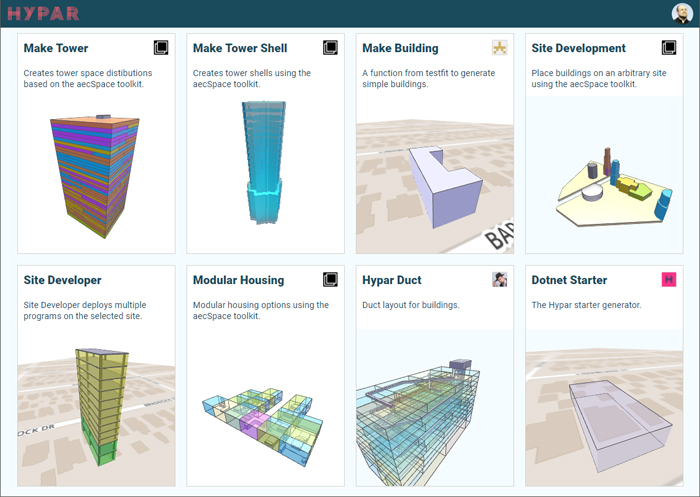
🖼 Hypar's space-planning options interface, via aecplustech.com
Common Feature Checklist
Cloud / Web Access✓ Yes
Real-Time CollaborationNot confirmed
Mobile App✕ No
Free Educational License✓ Yes
Public API / Integrations✓ Yes
Best For
Architecture, healthcare and workplace design teamsTesting program layouts quickly for client buy-in is the tool's specific, current focus.
Firms wanting automatic clearance/clash checking earlyCatching conflicts during space planning rather than late-stage BIM coordination.
Students and individuals evaluating for freeThe Personal tier supports genuine evaluation before a firm commits to Professional or Studio.
Consider Alternatives If
You need broader generative design beyond space planningTestFit or Autodesk Forma cover structure, massing and MEP-adjacent generation that today's Hypar doesn't focus on.
You remember Hypar as a code-first scripting sandboxConfirm directly with Hypar whether that original capability is still available, since the product has pivoted toward space planning.
You need volume pricing for a large team immediatelyGo straight to a Studio-tier conversation rather than starting on per-user Professional pricing.
Frequently Asked Questions
Is Hypar free to use?
Yes -- a Personal tier exists for students and evaluation, no card required, capped at 3 projects and 1 design option.
What happened to Hypar's original scripting/generative-design focus?
The product pivoted in 2024-2025 toward a space-planning-focused interface for non-programmers, a real change from its original code-first sandbox aimed at scripters.
Does Hypar export to Revit?
Yes, once a design option is approved it can be handed off to Revit.
Who founded Hypar?
Anthony Hauck, former head of Revit product development, and Ian Keough, creator of Dynamo, founded Hypar in 2018.
Used By
Extracted from hypar.io or confirmed directly by the firm -- not independently verified by BIM•STACK beyond that.
Community Rating
☆☆☆☆☆No ratings yet
Be the first to rate it
Thanks for rating Hypar!
Pricing
Free trial available
Free (Personal); $100/user/mo (Professional); Studio by quote
Pricing found on Hypar's own site in September 2026. Software pricing changes often — always confirm the current price on the vendor's site before buying.
Score Profile Prototype
Price5.5/10$100/user/mo (Professional) sits in the "mid" price band in our catalog — draft estimate.
Plugins4.5/10A functions/plugins ecosystem for computational design — draft estimate.
Performance6.5/10Cloud computation for generative design — draft estimate, no independent benchmarks.
This is a prototype, not a published score. Only the Price axis is derived from a verified catalog field (priceBand); the other axes are draft editorial estimates awaiting vendor/third-party sourcing before this ships publicly.