9 min read · Updated Sept 2026
Are you trying to manage staffing, billable time, project fees, and profitability inside an architecture practice? Do you need to control RFIs, submittals, drawings, field issues, and subcontractor collaboration during construction? Or are you a residential builder who needs to manage schedules and budgets while keeping homeowners informed?
Those are different jobs with different stakeholders, data, and workflows. A design firm needs visibility into people, fees, utilization, and labor budgets. A general contractor needs a structured system of record for documents, field activity, approvals, changes, and communication. A homebuilder needs project controls plus client-friendly scheduling, selections, and updates.
The four platforms in this guide serve distinct parts of the AEC project lifecycle: Monograph for architecture firms managing staffing, time, fees, and profitability; Procore for contractors and field teams; Autodesk Forma for Autodesk- and Revit-centered BIM coordination; and Buildertrend for homebuilders, remodelers, and residential contractors. The first step is simple: determine whether your biggest pain point is running the studio, running the jobsite, or running a residential client experience.
Project Management Software Is Not One Category
Generic project management tools can assign tasks, set due dates, and track progress. They can be useful, but they usually do not address the specialized requirements of AEC project delivery.
A building project can involve architects, engineers, owners, general contractors, subcontractors, suppliers, consultants, fabricators, inspectors, and field crews. These participants need different information at different stages. They also create documentation that can affect cost, schedule, quality, compliance, and contractual responsibility.
During design, architecture and engineering firms need to manage project schedules, consultant coordination, deliverables, client feedback, staff assignments, billable hours, project budgets, and fee burn. They also need to operate the firm itself: forecast capacity, measure utilization, plan hiring, and understand which projects are profitable.
During construction, the priorities change. Teams need current drawings and specifications, controlled workflows for RFIs and submittals, field reports, issue tracking, photos, safety and quality records, change documentation, and communication that is easy to retrieve later. Residential construction introduces another requirement: client participation. Homeowners need a clear way to view schedules, approve selections, review updates, make decisions, and understand changes without learning a commercial construction system.
Design-side needs
Architecture, engineering, and design practices usually need software that answers questions such as:
- Who is assigned to a project, and is the workload realistic?
- Is the firm spending more labor than planned against the project fee?
- Which projects are profitable, at risk, or consuming too much senior staff time?
- Are staff members overallocated or underutilized?
- Can leadership forecast capacity, backlog, hiring needs, and future revenue?
These are studio operations and professional-services management problems.
Construction-side needs
Construction teams instead need to answer questions such as:
- Is everyone working from the latest drawing set?
- Who owns an RFI, when is the response due, and what does it affect?
- Which submittals still require review or resubmission?
- Are field issues being documented and resolved before they create rework?
- Can the team connect an issue, decision, document, schedule impact, and cost impact?
These are construction administration, field coordination, and risk-control problems. A design firm can use a construction platform, and a contractor can use a studio-management platform, but neither choice is likely to be ideal. The best fit comes from matching the software to the work your organization performs most often.
At a Glance
AEC Software Comparison at a Glance
| Software | Best for | Core workflow | Key advantage | Consideration |
|---|
| Monograph | Architecture firms and design studios | Staffing, time tracking, fee management, utilization, and profitability | Built around design-firm operations | Not a replacement for full construction field management |
| Procore | General contractors and commercial construction teams | RFIs, submittals, documents, field workflows, financial controls | Broad construction-management platform and integration ecosystem | Can be more complex than small studios or residential teams need |
| Autodesk Forma | Autodesk and Revit-centered teams | BIM-connected design and construction coordination | Model-centric workflows within Autodesk's ecosystem | Best fit depends on how deeply the team relies on Autodesk tools |
| Buildertrend | Homebuilders, remodelers, and residential contractors | Residential jobs, schedules, budgets, selections, and client updates | Client-facing workflows tailored to homeowners | Less focused on enterprise commercial construction |
Monograph: Studio Management for Architecture Firms
Monograph is designed for architecture firms and design studios that need to manage the business side of project delivery. Rather than centering the product on jobsite processes, it focuses on project staffing, time, fees, budgets, utilization, and profitability.
That distinction matters. Architecture and engineering firms often rely on a mix of spreadsheets, calendars, timekeeping systems, accounting software, project schedules, and informal knowledge held by principals or project managers. This approach can work for a small team, but it becomes difficult to manage as project volume and staffing needs grow.
A principal may know the firm is busy without knowing whether its projects are profitable. A project manager may know that a deadline is approaching but not have a clear view of available staff capacity. Monograph is intended to bring projects, people, budgets, and time together in a more usable operational view.
Core use cases
- Staffing and resource allocation.
- Time tracking for billable and non-billable work.
- Labor budget and fee tracking.
- Budget-versus-actual reporting.
- Utilization analysis.
- Capacity planning and workload forecasting.
- Project performance and profitability visibility.
Why staffing and fee burn matter
Staffing affects quality, schedule, and profitability. Understaff a project and deadlines may slip, senior people may be pulled into production work, and the team may accumulate overtime. Overstaff a project and the firm may consume too much labor before reaching the next billing milestone.
Fee burn creates the same problem from a financial perspective. A fixed-fee design project can look healthy because invoices are still being issued, even while the team has already exceeded its planned labor budget. Without accurate time data and budget-versus-actual reporting, the project manager may not recognize the risk until the remaining fee is too small to complete the work profitably.
Best fit
Choose Monograph if you need better control of staffing, time, fee burn, project budgets, utilization, and profitability. It is not the ideal primary platform if your main challenge is managing active construction workflows with subcontractors, field teams, RFIs, submittals, drawings, and daily reporting. In that case, consider Procore or an Autodesk-connected workflow such as Autodesk Forma.
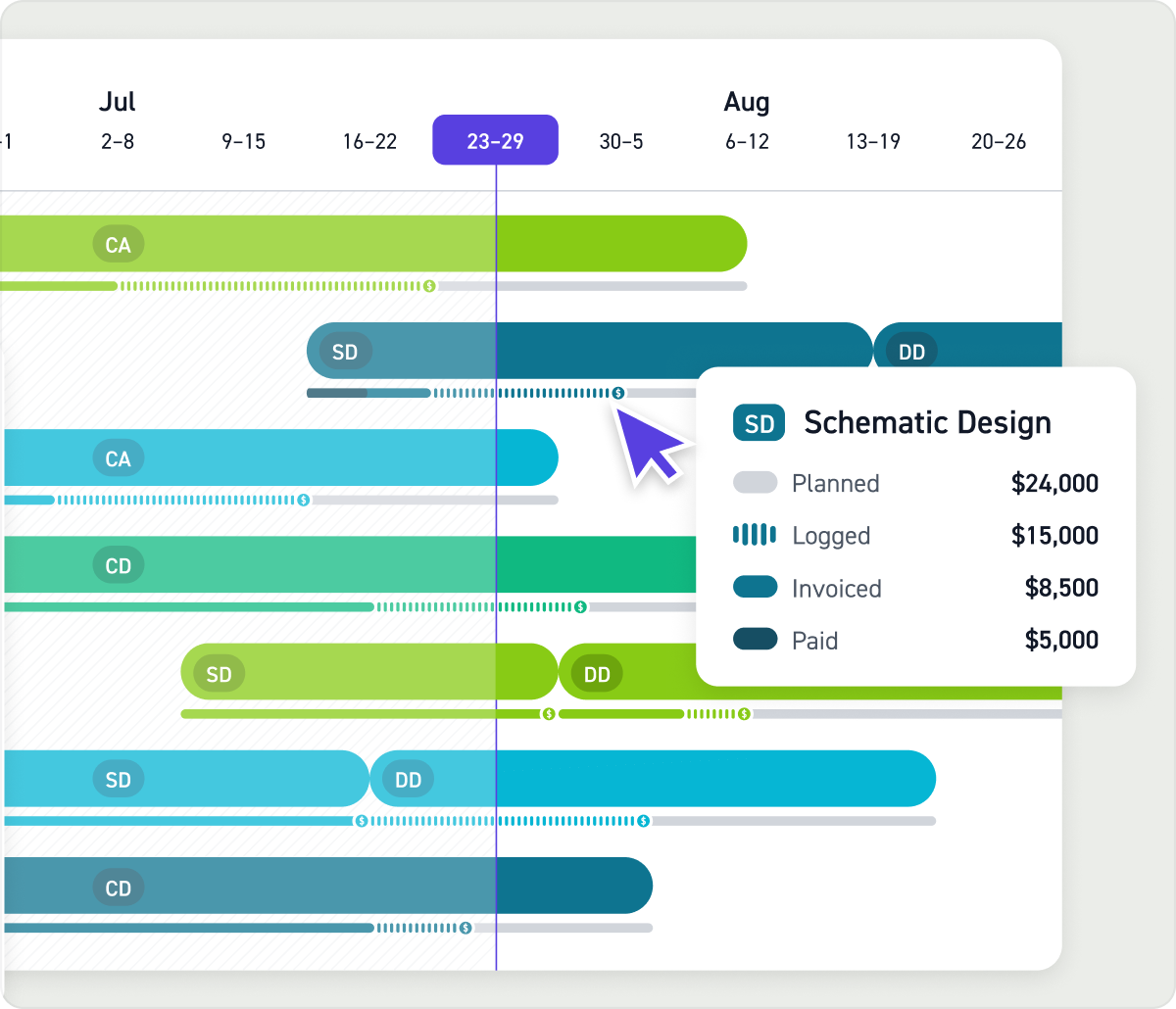
Monograph's firm management interface, from monograph.com
Studio OpsUsage-based
Built specifically for architecture firms — staffing, time tracking and budget-vs-actuals reporting in one place, with a simple, client-friendly interface rather than the dense, construction-oriented UI of the tools below.
View review & pricing →
Procore: Construction Management for the Build Phase
Procore is a construction management platform for teams managing active projects with substantial field coordination, documentation, and stakeholder complexity. It is particularly associated with commercial construction, where contractors, owners, consultants, architects, and subcontractors need to collaborate around a shared project record.
Construction projects create large volumes of information. Drawings change. RFIs raise design or constructability questions. Materials must be reviewed and approved. Field conditions create unexpected work. When that information lives across email threads, shared drives, paper drawings, text messages, and separate spreadsheets, the project team can lose control. Procore is built to centralize those workflows.
Core use cases
- Drawing and document control.
- RFIs and submittals.
- Daily logs, site photos, observations, and field reports.
- Meetings, action items, and project correspondence.
- Quality and safety workflows.
- Change management and budget visibility.
- Collaboration with subcontractors, owners, architects, and field personnel.
- Connections to accounting, scheduling, ERP, and other business systems.
RFIs, submittals, and field records
An RFI is not just a question. It may identify an ambiguity, conflict, missing detail, or field condition that affects cost, schedule, quality, or constructability. A construction platform helps the team record the issue, identify who owns the response, attach relevant documents, manage due dates, and distribute the final answer to affected parties.
Submittals have similar complexity. They may move between subcontractors, general contractors, architects, engineers, consultants, and owners. The team needs to track revisions, review comments, approvals, resubmissions, and outstanding deadlines. Email can handle fragments of that process, but it is not a reliable system of record.
Best fit
Choose Procore if you are a general contractor, construction manager, commercial builder, large specialty contractor, or owner managing complex projects with multiple stakeholders and formal construction workflows. A small architecture firm focused primarily on time tracking and staffing may find Procore unnecessarily heavy. A residential remodeler may also prefer a platform designed around client communication and selections, such as Buildertrend.
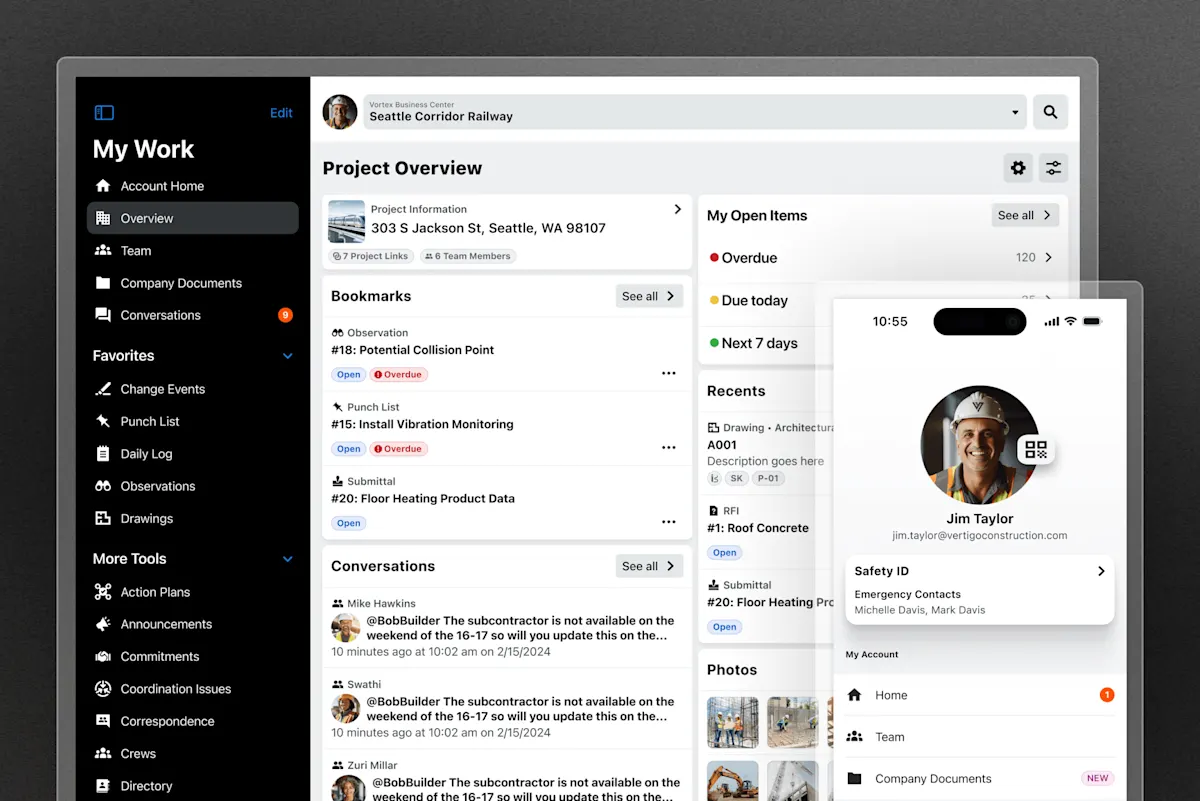
Procore's unified construction platform interface, from procore.com
ConstructionCustom quote
Full construction project management platform with financial and field tools — RFIs, submittals, daily logs — plus the largest third-party integration ecosystem in the category.
View review & pricing →
Autodesk Forma: BIM-Connected Coordination
Autodesk Forma is worth evaluating for teams that are deeply invested in Autodesk and Revit-based workflows. Its primary attraction is model-connected coordination across design and construction participants.
Traditional construction coordination relies on drawings, specifications, meeting notes, RFIs, and submittals. Those remain essential. However, BIM-centered teams also work with three-dimensional models containing spatial, geometric, and system information. Reviewing an issue in the context of a model can help project teams understand conflicts, communicate design intent, and coordinate complex systems more effectively — particularly valuable on projects with dense MEP systems, structural complexity, prefabrication, repetitive components, or high coordination risk.
For a Revit-heavy organization, the project model is not simply a deliverable exported at key milestones. It can be a central coordination environment used throughout the project. The strongest use case is a team that wants to reduce handoff friction between design and construction and organize discussions around BIM context — that does not eliminate formal construction records; RFIs, submittals, drawings, specifications, and contract documents remain important.
Forma versus Procore
| Decision factor | Autodesk Forma | Procore |
|---|
| Main advantage | Autodesk ecosystem and BIM-connected coordination | Broad construction administration and field management |
|---|
| Best fit | Revit- and model-centric teams | Contractors with extensive field, document, financial, and partner workflows |
|---|
| Key question | How central are Revit and BIM coordination to project delivery? | How much breadth is needed across construction operations and integrations? |
|---|
Choose Autodesk Forma when your teams depend on Revit, BIM coordination, and Autodesk-connected workflows. Choose Procore when broader construction management, field activity, and third-party integration needs lead the decision.
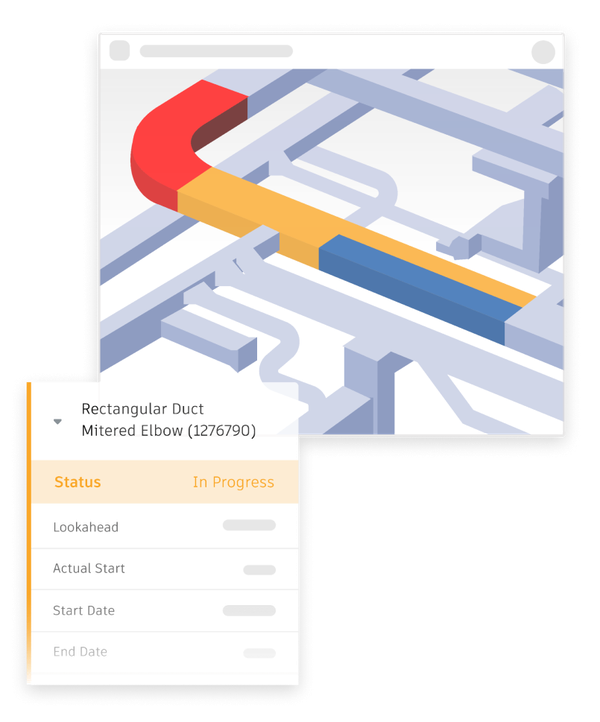
Autodesk Forma's model coordination workflow (formerly Autodesk Construction Cloud), from construction.autodesk.com
Construction$307/mo
Autodesk's cloud platform connecting design and construction teams around a shared model (formerly sold as Autodesk Construction Cloud) — the natural pick when your field team needs to coordinate directly against the architect's live Revit model rather than exported drawings.
View review & pricing →
Buildertrend: Residential Project Management and Client Communication
Buildertrend is designed for homebuilders, remodelers, and residential contractors. It combines project controls with client-facing workflows, which is a meaningful difference from commercial construction platforms.
Residential projects require schedules, budgets, change decisions, subcontractor coordination, photos, documents, and job tracking. But homeowners are also active participants. They need to approve selections, understand upcoming milestones, receive updates, review changes, and ask questions in a clear environment. A client portal is therefore not just a convenience — it can reduce confusion, make approvals easier to track, improve transparency, and create a more professional customer experience.
Core use cases
- Residential project schedules.
- Budgets and job costing.
- Client communications and homeowner portals.
- Selections and approval workflows.
- Change orders.
- Progress updates and photos.
- Subcontractor coordination.
- Warranty and post-construction communication.
Buildertrend versus Procore
Buildertrend and Procore both support construction work, but their primary markets differ. Procore is generally better suited to complex commercial construction workflows with formal documentation, large trade networks, and enterprise-scale coordination. Buildertrend is more naturally aligned with residential delivery, homeowner communication, and selections.
Choose Buildertrend if you are a custom home builder, production builder, residential remodeler, design-build residential firm, or specialty contractor that needs a client-friendly project management system. Choose Procore if your projects require deep commercial construction administration, extensive RFIs and submittals, or broader enterprise controls.

Buildertrend's project scheduling interface, from buildertrend.com
HomebuildingCustom quote
Project management aimed specifically at homebuilders and remodelers, with a client communication portal that Procore's more commercial-construction-oriented interface doesn't prioritize in the same way.
View review & pricing →
Decision Framework
How to Choose the Right Platform
Start with your workflow, not the software brand. Ask which recurring problem costs the organization the most time, money, risk, or client trust:
- Are project fees being consumed too quickly?
- Is staffing based on assumptions rather than reliable capacity data?
- Are teams working from outdated drawings?
- Are RFIs, submittals, and field issues lost in email?
- Are changes disconnected from budget and schedule impacts?
- Are homeowners frustrated by poor communication?
- Is BIM coordination central to your project risk profile?
Then match the answer to the platform category: choose Monograph for design studio operations, staffing, time, fees, and profitability; choose Procore for construction management, field workflows, documents, RFIs, submittals, and financial coordination; choose Autodesk Forma for Autodesk- and Revit-centered BIM coordination; choose Buildertrend for residential project delivery, selections, schedules, and homeowner communication.
Many AEC companies will use more than one platform. An architecture firm may use Monograph internally while collaborating through a construction system during construction administration. A general contractor may use Procore alongside specialized accounting, estimating, scheduling, and payroll tools. The goal is not to own the fewest software tools — it is to give each critical workflow a clear system of record and reduce duplicate data, missed handoffs, and unclear ownership.
Common Questions
Common Questions
What's the difference between Monograph and Procore?
Monograph helps architecture and design firms manage people, time, fees, budgets, utilization, and profitability. Procore helps construction teams manage the build phase through documents, RFIs, submittals, field workflows, collaboration, and construction financial processes. In simple terms, Monograph helps a design practice run its business; Procore helps a construction team run the job.
Is Autodesk Forma better than Procore?
Neither platform is universally better. Autodesk Forma is strongest for teams whose coordination workflow is deeply connected to Autodesk and Revit models. Procore is stronger for organizations that need broad construction management, field processes, financial workflows, and a large integration ecosystem.
Can one tool cover design and construction?
Usually not perfectly. Design operations require data about staff time, fee budgets, utilization, and profitability. Construction management requires data about drawings, RFIs, submittals, field conditions, subcontractors, quality, safety, and changes. Most organizations that work across both sides benefit from complementary systems rather than forcing one platform to perform every role.
Choose the software built for the part of the project lifecycle where your team needs the most help. Choose Monograph for design-firm staffing, time, fee, budget, and profitability management. Choose Procore for complex construction coordination and field workflows. Choose Autodesk Forma when BIM and Revit-connected coordination are core requirements. Choose Buildertrend for residential construction management and homeowner communication.
Before committing to a platform, map your current workflow and use real project scenarios during demos. Ask each vendor to demonstrate how its software handles an actual staffing conflict, fee-burn issue, RFI, submittal, field observation, model coordination problem, homeowner selection, or change order. That approach will show whether the tool fits your business better than a generic feature checklist ever can.
Pricing and feature claims were verified directly on each vendor's own site in September 2026 and may change — always confirm current pricing before buying.