Speckle
Open-source data-interoperability platform that connects AEC tools (Revit, Rhino, Forma, ProjectWise and more) via a shared data hub.
Speckle is an open-source data platform for the AEC industry -- not a modeling tool in the sense that Revit or Rhino are, but a connective layer that sits between the modeling, analysis and coordination tools a project team already uses. Its own engineering team describes it as "the Git and Hub for geometry and BIM data": rather than exporting a model to a neutral file format, emailing it, and hoping nothing breaks on import, Speckle treats every model as structured, versioned, queryable data that can be streamed between applications, visualized in a browser, and queried programmatically. The pitch is that AEC data shouldn't be trapped inside whichever authoring tool created it, and that the industry's habit of re-exporting, re-importing and manually reconciling files between disciplines is a solvable data-plumbing problem rather than an unavoidable cost of multidisciplinary work.
The company, Speckle Systems, was founded in May 2020 by Dimitrie Stefanescu, who holds a PhD from The Bartlett School of Architecture at UCL. Stefanescu has been public about the reasoning behind an open-source strategy in a market dominated by closed, vendor-locked platforms: he has argued that open-sourcing the core server and connectors was the only realistic way for a new entrant to earn trust in an industry where every major authoring tool already has its own proprietary data format and little incentive to interoperate cleanly with competitors. That bet shaped the product from day one -- the server, the connectors and the underlying object model are all published on GitHub under the specklesystems organization, and the hosted app at speckle.systems is one way to use that same open-source core, not a separate closed product bolted on top of an open-source demo.
Because the server code is open source, a firm with its own infrastructure team can self-host a private Speckle instance instead of relying on Speckle's own cloud -- Speckle publishes its own deployment documentation covering self-hosted server setup and the tradeoffs against using the hosted SaaS version. For most firms this stays theoretical (running and patching your own server is real ongoing work), but for larger practices, public-sector clients or anyone with strict data-residency or security requirements, it's a genuine option that closed-source competitors in this space generally don't offer at all. On the hosted side, Speckle also lets paid customers pick a data region -- the UK by default, or the EU, US, APAC (Australia) or Canada -- which matters for firms working under GDPR or public-sector data-sovereignty rules.
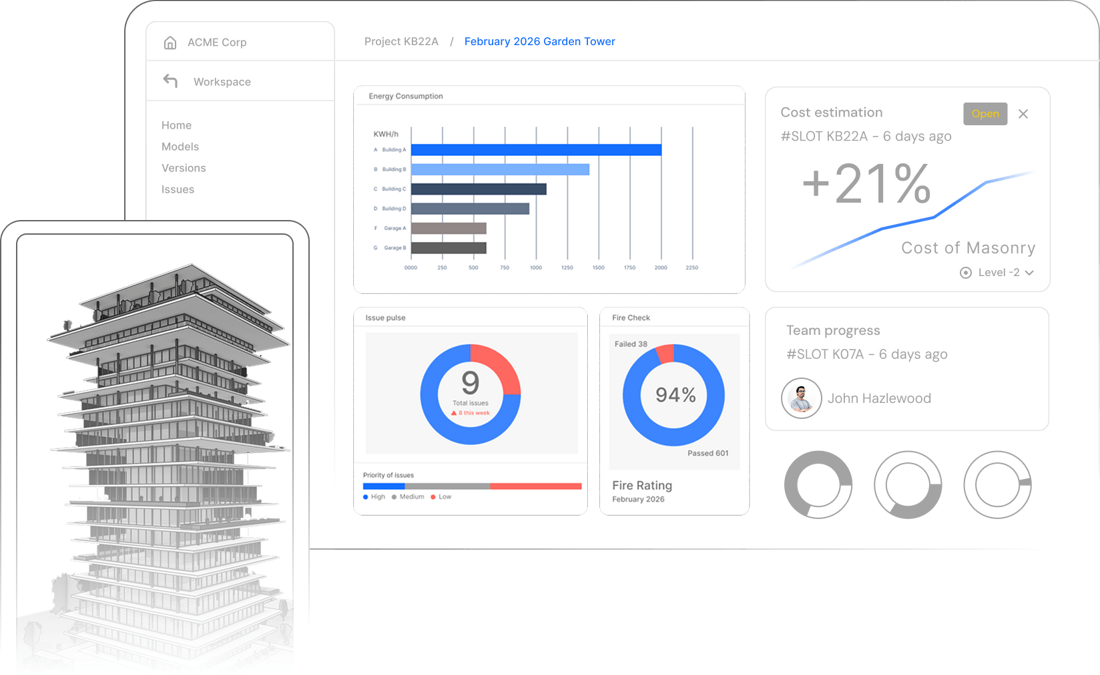
Underneath the connectors, Speckle's object model is version-controlled the way source code is: every push to a "stream" (Speckle's term for a shared project data container) is a new version with full history, rather than a single file that gets silently overwritten. That's what lets Speckle show a running history of how a model evolved, roll back to an earlier version, and let multiple disciplines push their own updates into the same shared data pool without one team's export overwriting another's. On top of that versioned data layer sit three product surfaces: Speckle Design Review, a browser-based 3D viewer for exploring synced models with issues, markups and shareable presentations (including white-labelled embeds on paid plans); Speckle Automate, a workflow-automation layer for running custom checks and functions against incoming model data (for example, flagging models that fail a naming-convention or QA rule the moment they're pushed); and Speckle Intelligence, the platform's newer native AI layer, which powers project- and portfolio-level dashboards that surface metrics across live models rather than requiring someone to manually query them.
Integrations are where Speckle's pitch is most concrete, and it's worth walking through what's actually connected rather than treating "integrations" as a marketing checkbox. On the authoring side, Speckle ships dedicated connectors for Revit, Rhino, Grasshopper, SketchUp, Blender, Archicad, AutoCAD, Civil 3D, Plant 3D and Vectorworks -- each one turns a native model into a connected, data-rich Speckle stream that stays in sync as the source file changes, rather than a one-time export. On the engineering and coordination side, it connects to Tekla for detailed steel/concrete models, ETABS for structural analysis data, and Navisworks for federated coordination models, so a structural engineer's analysis results and a contractor's clash-detection model can live in the same data layer as the architect's design model instead of three disconnected files. IFC import gives it a vendor-neutral path for any tool that can export the open BIM format, which matters for teams working with software Speckle doesn't have a native connector for. On the platform side, it syncs automatically with Autodesk Construction Cloud (ACC) so changes on an ACC project flow into Speckle's model insights and analytics without a manual re-push, and an early-access integration with Bentley's ProjectWise is open for waitlist signup, extending that same idea to Bentley-centric infrastructure workflows. The newest connectors point toward a different audience entirely: Power BI has been supported for a while (loading 3D model data into BI dashboards for design coordination and reporting), but the addition of Databricks and Snowflake connectors is a clearer signal that Speckle is positioning itself not just as a bridge between AEC design tools, but as a way to get AEC model data into the same enterprise data warehouses and AI/analytics pipelines a firm's business-intelligence team already runs everything else through.
Pricing follows a fairly standard open-core SaaS shape. The free "Explore" plan covers one project, up to three users, all file importers and connectors, one project dashboard, a 30-day version history and community support -- enough to genuinely evaluate the connectors and the viewer, not just a crippled demo. Paid plans (billed as custom quotes rather than published per-seat pricing) remove the project/user caps, add CDE integrations like Forma and ProjectWise, unlimited Speckle Intelligence dashboards including portfolio-level views, Speckle Automate, full version history, cross-project model-validation rules, SSO and custom data regions. Speckle is also free for students and educators, consistent with most of the BIM tools it connects to. Because there's no published price list for the paid tier, firms evaluating it at scale should expect a sales conversation rather than a self-serve checkout once they outgrow the Explore plan's single-project limit.
Beyond the product itself, Speckle maintains a visible open-source community rather than treating its GitHub presence as a formality: the specklesystems organization hosts the server, connectors and SDKs publicly, there's an active community forum for support and feature discussion, and a tutorials portal walks new users through connector setup and common workflows. That matters for evaluating an open-source-first vendor -- a healthy public issue tracker and forum are a reasonable proxy for whether the open-source claim is substantive or just a licensing technicality, and Speckle's repositories show ongoing commits and community engagement rather than an abandoned mirror of a closed product.
Editor’s takeBIM•STACK editor's take: Speckle solves a real, specific problem -- the constant friction of moving data between tools that were never designed to talk to each other -- and it does so with a genuinely open architecture rather than a closed plugin ecosystem you have to trust blindly. The free tier is honest enough to actually test the connectors that matter to your stack before committing to anything. The tradeoff is that Speckle isn't a design tool you'd choose on its own; its value is entirely a function of how many of the tools on both ends of a workflow it already connects, so the right way to evaluate it is to check the specific connector pair you need (say, Revit-to-Power-BI, or Rhino-to-ETABS) rather than judging the platform in the abstract.
Speckle's learning curve splits cleanly into two very different experiences depending on how deep a user goes. Installing a connector and pushing a model from Revit, Rhino or SketchUp into a Speckle stream is a genuinely light lift -- it's designed to feel like publishing a file, not like configuring middleware, and most users can get a model synced and viewable in the browser within their first session. Firms evaluating Speckle purely as a way to share live, versioned models for review and coordination should expect a short ramp-up measured in hours, not weeks, since the connector UI does most of the work of mapping a native model into Speckle's object schema automatically.
The curve gets steeper the moment a team wants to do more than sync and view models. Speckle Automate functions, custom validation rules, and anything that touches the API or object model directly assumes comfort with code -- Speckle's automation and developer tooling is built for teams that either have in-house developers or are willing to invest in that skill set, and self-hosting the server is a genuinely technical undertaking that requires real DevOps capacity, not just a checkbox in an admin panel. In practice, most firms land somewhere in between: a design or BIM team adopts the connectors and viewer with minimal training, while any custom automation, validation rule-building or self-hosted deployment gets handled by a smaller technical group (in-house developers, a BIM/VDC lead with scripting experience, or Speckle's own solutions team on paid plans) rather than the whole firm learning the platform's deeper layers.
- Multidisciplinary teams juggling several authoring toolsFirms where architecture, structural engineering and contractors each work in different native software (Revit, Rhino, Tekla, ETABS, Civil 3D) benefit most from a shared, synced data layer instead of repeated manual exports.
- Firms with in-house development or BIM/VDC scripting capacitySpeckle Automate, custom validation rules and the API reward teams that can write and maintain their own automation rather than relying purely on out-of-the-box GUI workflows.
- Organizations with data-residency or security requirementsThe choice between hosted regions (UK, EU, US, APAC, Canada) or a fully self-hosted server suits public-sector clients or firms under strict data-sovereignty rules.
- Teams that need model data in BI/reporting pipelinesThe Power BI, Databricks and Snowflake connectors suit firms that already report on project data outside of AEC-specific tools and want model metrics folded into that same reporting layer.
- Students, educators and open-source-friendly practicesThe genuinely capable free tier and education access make it approachable for firms or students wanting to trial real interoperability workflows without a purchase.
- You only need clash detection and coordination, not a data platformNavisworks or Revizto are purpose-built for model aggregation and clash detection without Speckle's broader data-interoperability and automation scope.
- You need a straightforward common data environment, not a developer-facing APITrimble Connect, Catenda Hub or BIMcollab are more GUI-first CDE options if your team doesn't want to touch code or self-host anything.
- Your firm works almost entirely inside one vendor's ecosystem alreadyIf every discipline already works natively in Autodesk or Bentley tools with no outside connectors needed, native platform tools like Autodesk Construction Cloud or Bentley iTwin may cover the same ground with less setup.
- You need enterprise BIM checking rather than data interoperabilitySolibri is more focused on rule-based model QA/QC than on moving data between authoring tools.
- You want a fully managed platform with published per-seat pricingSpeckle's quote-based paid tier means firms that want transparent, self-serve pricing upfront may prefer a vendor that publishes its plan costs outright.
Is Speckle free to use?
Yes, the Explore plan is free and includes one project, up to three users, all file importers and connectors, and a 30-day version history. Paid plans remove those caps and add features like Speckle Automate, unlimited Intelligence dashboards and SSO, priced as a custom quote rather than published per-seat pricing.
Is Speckle actually open source?
Yes. The Speckle server, connectors and underlying object model are published on GitHub under the specklesystems organization, and Speckle publishes its own documentation for self-hosting a private server instead of using the hosted SaaS version.
What software does Speckle integrate with?
Native connectors include Revit, Rhino, Grasshopper, SketchUp, Blender, Archicad, AutoCAD, Civil 3D, Plant 3D, Vectorworks, Tekla, ETABS and Navisworks, plus IFC import, sync with Autodesk Construction Cloud (ACC), an early-access Bentley ProjectWise integration, and data connectors for Power BI, Databricks and Snowflake.
Who founded Speckle and when?
Speckle Systems was founded in May 2020 by Dimitrie Stefanescu, who holds a PhD from The Bartlett School of Architecture at UCL.
Can I self-host Speckle instead of using the cloud version?
Yes -- because the server code is open source, Speckle publishes deployment documentation for running your own private server, an option relevant for firms with strict data-residency or security requirements.
Is Speckle a replacement for Revit or Rhino?
No. Speckle is a data-interoperability and automation layer that connects to authoring tools like Revit and Rhino -- it doesn't replace them, and its value depends on how many tools in your existing workflow it already connects.







