Veras
AI rendering plugin by EvolveLAB that generates photorealistic visualizations from CAD/BIM models.
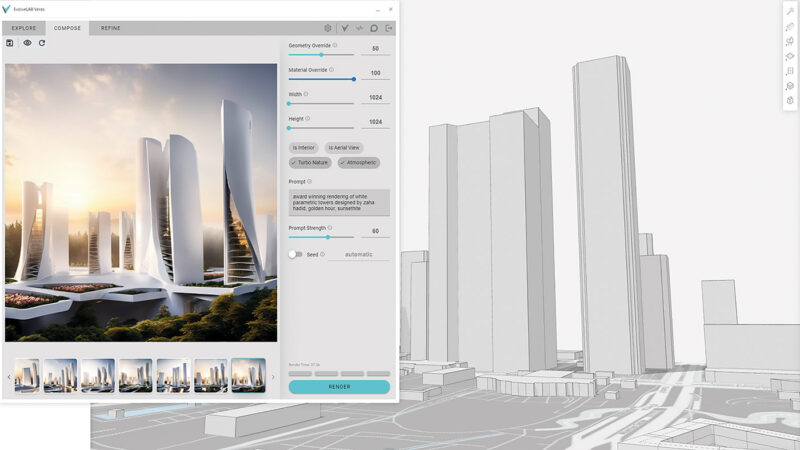
Veras is an AI-powered rendering plugin developed by EvolveLAB, designed to work directly within SketchUp, Revit, Rhino and other 3D modeling tools to generate photorealistic, stylistically varied renders from a project's actual 3D geometry -- a meaningfully different approach from a general-purpose text-to-image tool like Midjourney, since Veras renders are grounded in the real project model rather than generated purely from a text description.
EvolveLAB itself is a Colorado-based AEC-technology company with a track record building computational-design and automation tools for the architecture industry before developing Veras specifically to apply generative AI to the rendering workflow, positioning it within an existing company with real domain expertise rather than a brand-new standalone AI startup.
The core value proposition is speed and stylistic exploration without leaving your existing modeling tool: rather than exporting geometry to a separate rendering application (like 3ds Max with Arnold, or a real-time renderer like Enscape or D5 Render) and waiting for a full render pipeline, Veras generates AI-enhanced, photorealistic-style variations directly from a viewport view of the model in seconds, letting designers explore many material/lighting/style options quickly during design review.
Because Veras works as a plugin within tools architects already use daily (SketchUp, Revit, Rhino) rather than a separate rendering application, it lowers the workflow friction of getting AI-enhanced visualization into everyday design review, positioning it as a complement to (rather than a replacement for) full production-quality rendering tools used for final client-facing deliverables.
Veras' style-transfer approach lets users apply a wide range of material, lighting and even artistic styles to the same underlying viewport view, making it genuinely useful for rapid client-facing options presentations -- generating several stylistically distinct takes on the same design in the time it would otherwise take to set up and render even a single option in a full production renderer.
EvolveLAB has also positioned Veras within a broader suite of computational-design and automation tools for AEC, meaning firms already using other EvolveLAB products may find additional workflow integration value beyond Veras' rendering capability alone, reflecting the company's broader strategy of building interconnected tools for the same architectural design process rather than a single standalone product.
Editor’s takeBIM•STACK editor's take: Veras' plugin-based, model-grounded approach is a genuinely useful middle ground between text-prompt tools like Midjourney (fast but disconnected from the actual design) and full production renderers like 3ds Max or D5 Render (accurate but slower) -- it's specifically built for rapid design-review-stage visualization exploration directly from your actual project geometry. Firms should recognize Veras' role as an exploration/design-review aid rather than a final-deliverable rendering replacement, and verify current pricing directly with EvolveLAB.
Because Veras works as a plugin within tools architects already use daily, the core interaction (selecting a viewport, choosing a style, generating variations) requires minimal additional training beyond normal use of SketchUp, Revit or Rhino.
Getting the most useful stylistic variations does involve some iteration on style prompts and settings, similar to other generative-AI tools, though the starting point (an actual model view) removes much of the ambiguity a pure text-prompt tool requires.
Design teams new to AI-assisted rendering generally find Veras' plugin format eases adoption specifically because it doesn't ask them to change their primary modeling workflow at all -- they keep working in SketchUp, Revit or Rhino as usual and simply add a rendering step, rather than needing to learn an entirely separate rendering application's interface and settings from scratch.
- Design teams wanting fast visualization directly from their working modelGrounded in actual project geometry rather than disconnected text-prompt imagery.
- Firms already using SketchUp, Revit or Rhino dailyPlugin-based workflow adds AI rendering without switching to a separate application.
- Design-review-stage stylistic explorationFast generation of material/lighting/style variations for internal design discussions.
- You need production-quality final renders for client deliverables3ds Max with Arnold, D5 Render or similar full rendering tools are built for that final-output quality bar.
- You want pure aesthetic/mood exploration without a 3D modelMidjourney generates from text prompts alone, useful earlier before a model exists.
- You need to upscale or refine existing rendered imagesMagnific focuses specifically on AI upscaling and refinement of existing imagery.
What is Veras used for?
Generating AI-enhanced, photorealistic-style renders directly from a project's actual 3D model, for fast design-review visualization.
What software does Veras work with?
It's a plugin for SketchUp, Revit, Rhino and other 3D modeling tools.
Who makes Veras?
EvolveLAB, a Colorado-based AEC-technology company.
How much does Veras cost?
Check EvolveLAB's site directly for current subscription plans and pricing.
Is Veras a replacement for a full rendering tool like 3ds Max?
No -- it's best suited to fast design-review-stage exploration, complementing rather than replacing production-quality final rendering tools.