WiseBIM AI
Revit add-in that uses AI to convert imported 2D drawings into Revit walls, windows, doors and slabs.
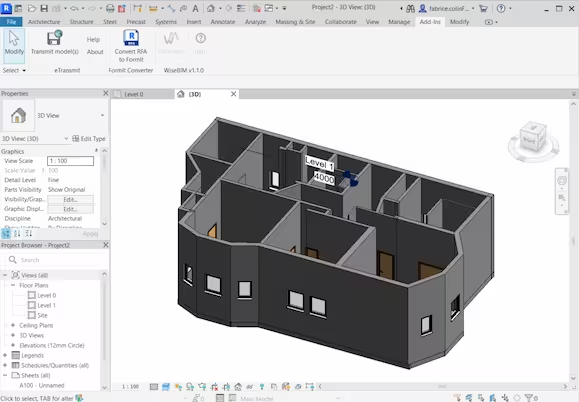
WiseBIM AI is a Revit add-in that uses artificial intelligence to convert imported 2D drawings directly into native Revit elements -- walls, windows, doors and slabs -- automating one of the most tedious, time-intensive tasks in BIM adoption: manually redrawing an existing 2D drawing set as a 3D BIM model from scratch.
The tool accepts a genuinely broad range of source-file formats as input -- DWG, DXF, PDF, JPEG, TIFF or PNG -- meaning it can work directly from scanned paper drawings or old raster image files, not just clean vector CAD files, which matters in practice since many existing-building or renovation projects only have older, non-vector drawing sets available as a starting point.
Before running detection, users can configure specific parameters to guide how the AI interprets the source drawing, then the tool generates the resulting Revit model in seconds -- a dramatic speed difference versus the hours or days a skilled BIM technician would otherwise spend manually tracing walls, windows, doors and slabs from the same source drawing.
As a Revit-specific plugin (distributed via the Autodesk App Store/marketplace) rather than a standalone application, WiseBIM AI is built to slot directly into a firm's existing Revit-centered BIM workflow -- there's no separate application to learn, and the output arrives as native Revit geometry ready for further detailing within the same model.
At $49/month, WiseBIM AI sits at an accessible price point relative to enterprise-scale BIM-automation tools in this catalog, positioning it as a practical option for individual users or smaller teams needing occasional 2D-to-Revit conversion rather than requiring an enterprise sales conversation and large annual commitment.
Editor’s takeBIM•STACK editor's take: WiseBIM AI targets a specific, well-understood BIM-adoption pain point -- converting existing 2D drawings (including scanned or raster files) into native Revit geometry -- with genuine speed advantages over manual tracing. Its accessible $49/month pricing and native Revit integration make it a reasonable tool to trial for firms doing renovation or existing-building work where a full 2D drawing set already exists and needs to become a working BIM model quickly, though firms should verify detection accuracy against their own specific drawing conventions before relying on it for complex or non-standard drawing sets.
Because WiseBIM AI works as a Revit add-in rather than a separate application, the core learning curve is short for existing Revit users -- importing a source drawing, configuring detection parameters and running the conversion is a workflow most Revit users can pick up quickly without leaving their familiar Revit environment.
Getting the most accurate results does involve learning to tune the configurable detection parameters to match a specific firm's drawing conventions and the quality of a specific source file, since scanned or lower-quality raster inputs generally need more parameter adjustment and post-conversion manual review than clean vector CAD files.
Firms should expect an initial calibration period across their first few converted drawings to learn how much manual cleanup a typical converted model needs, building a realistic sense of the tool's accuracy on their own specific drawing types before relying on it for time-sensitive project work.
- Firms converting existing 2D drawing sets to Revit BIM modelsDirectly automates a historically manual, time-intensive redrawing task.
- Renovation and existing-building projects with only older drawings availableAccepts scanned paper drawings and raster image formats, not just clean vector CAD files.
- Individual users and smaller teams needing occasional conversion workAccessible $49/month pricing avoids a large enterprise commitment for occasional use.
- You need a similar workflow outside RevitVerify whether a comparable AI 2D-to-BIM tool exists for your specific BIM authoring platform, since WiseBIM AI is Revit-only.
- You need enterprise-scale, multi-discipline 2D-to-BIM automation with clash detectionQikBIM targets a broader, cross-discipline conversion and coordination workflow at enterprise pricing.
- You need cloud-based or real-time collaborative accessWiseBIM AI doesn't currently offer cloud, collaboration or mobile-app capability per its own published feature data.
What is WiseBIM AI used for?
A Revit add-in that uses AI to convert imported 2D drawings into native Revit walls, windows, doors and slabs.
How much does WiseBIM AI cost?
$49/month.
Does WiseBIM AI integrate with Revit?
Yes -- it's a Revit-specific plugin distributed via the Autodesk App Store.
What file formats does WiseBIM AI accept?
DWG, DXF, PDF, JPEG, TIFF or PNG, including scanned paper drawings and raster image files.
How fast does WiseBIM AI generate a model?
The tool generates the Revit model in seconds after detection parameters are configured.