9 min read · Updated Sept 2026
The weeks spent massing a site that never penciled, the re-drawing of an existing building from a 1970s PDF set, the outsourced renders, the documentation grind that quietly eats a huge part of the fee. The creative work pays. The repetitive work bleeds.
That's the lens I'd use for every tool below. I pulled all of them from our directory, and the pattern that jumps out isn't "AI designs buildings now" — it's that the slow, expensive, repetitive parts of production are collapsing in both time and cost. Pricing comes from each vendor's own site, verified September 2026.
The Math
The Math That Frames Everything
Here's a number worth keeping in your head: many of the lower-cost tools here cost less per month than a single billed hour at many firms.
Maket is $100/mo. MyArchitectAI is $29/mo. Magnific is $14.50/mo. Midjourney is $10/mo. Stack a lean AI workflow kit — Midjourney, Spacio (free tier), MyArchitectAI, Magnific, WiseBIM AI, Maket — and you're at roughly $203/mo, about the price of one Revit seat at $251/mo.
So the question every firm should be asking isn't "can we afford AI tools." It's "how many billed hours does each one have to save per month to pay for itself." For most of them, the answer is: one.
Feasibility
The Biggest Cost You Never See
The most expensive thing a studio does is design a project that dies. Weeks of massing, unit mixes, parking studies — all for a site that was never going to work, or a pro forma that never penciled.
This is where AI production gains are the biggest, and it's not close:
- Spacio (free tier) runs daylight, wind, and code checks live while you sketch massing. That's a site analysis that used to take a day, running in the background.
- Archistar ($79.17/mo) reads zoning overlays and generates compliant envelopes plus financial feasibility reports — ruling a site in or out before design time gets spent on it.
- TestFit (from $195/mo) turns hours of manual parking and unit-mix iteration into minutes.
The production gain isn't "faster site studies," though that's true. It's that your expensive people stop spending days on dead sites. These tools can compress a long feasibility pass into a much faster first round — and the fee you save either becomes margin or becomes time to design better on the sites that survive.
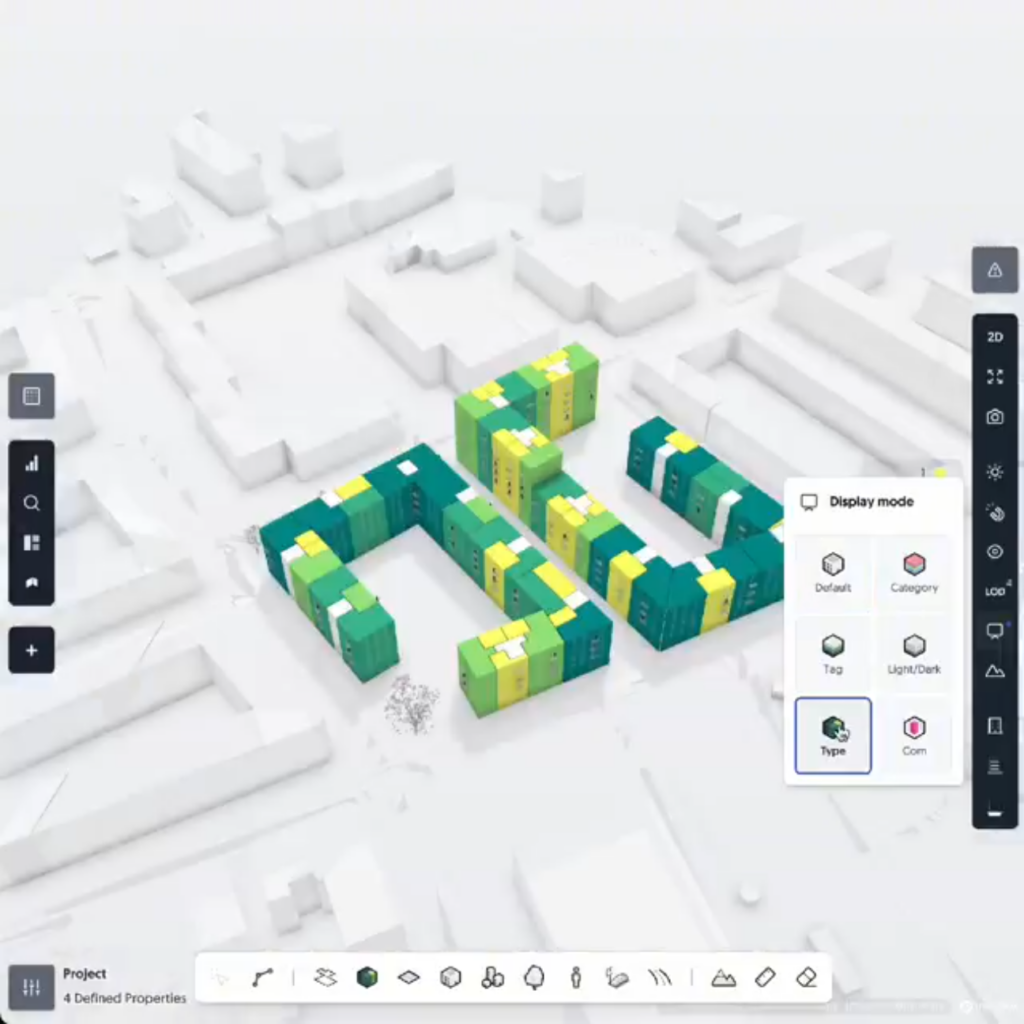
Spacio's design interface, via archsupply.com
AI Tools · FeasibilityFree tier available
Browser-based AI platform for early-stage building design with live daylight, wind and code feedback as you sketch massing — a site analysis that used to take a day, running in the background.
View review & pricing →
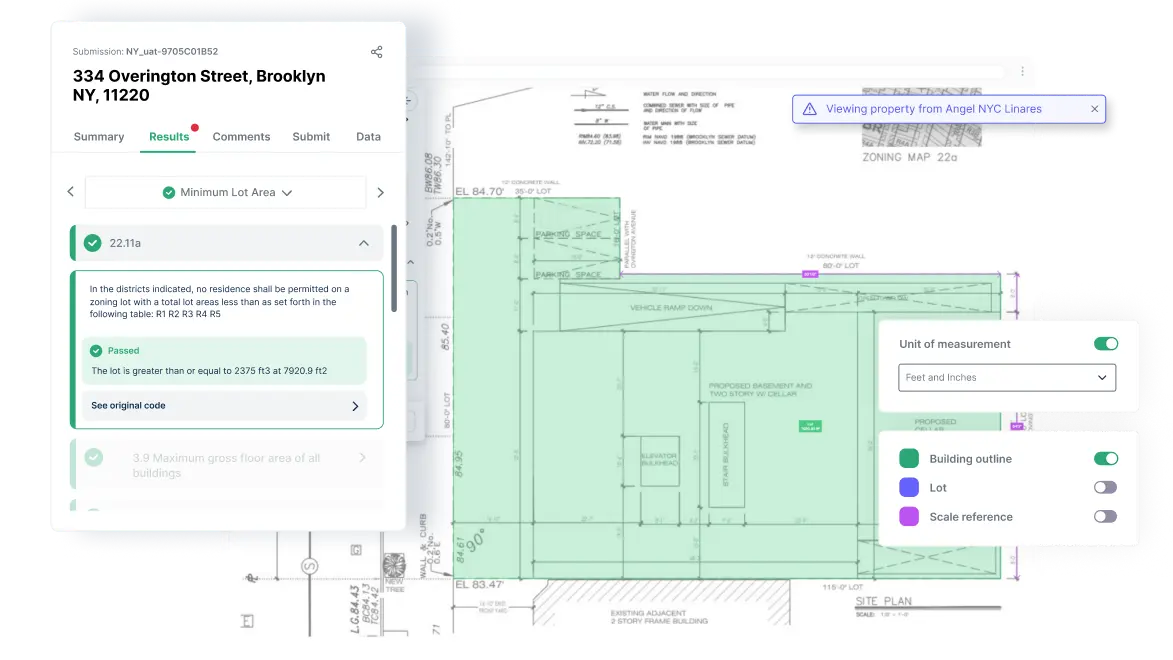
Archistar's AI PreCheck platform interface, from archistar.ai
AI Tools · Feasibility$79.17/mo (Basic, billed annually)
Reads zoning overlays and generates compliant building envelopes plus financial feasibility reports — ruling a site in or out before design time gets spent on it.
View review & pricing →
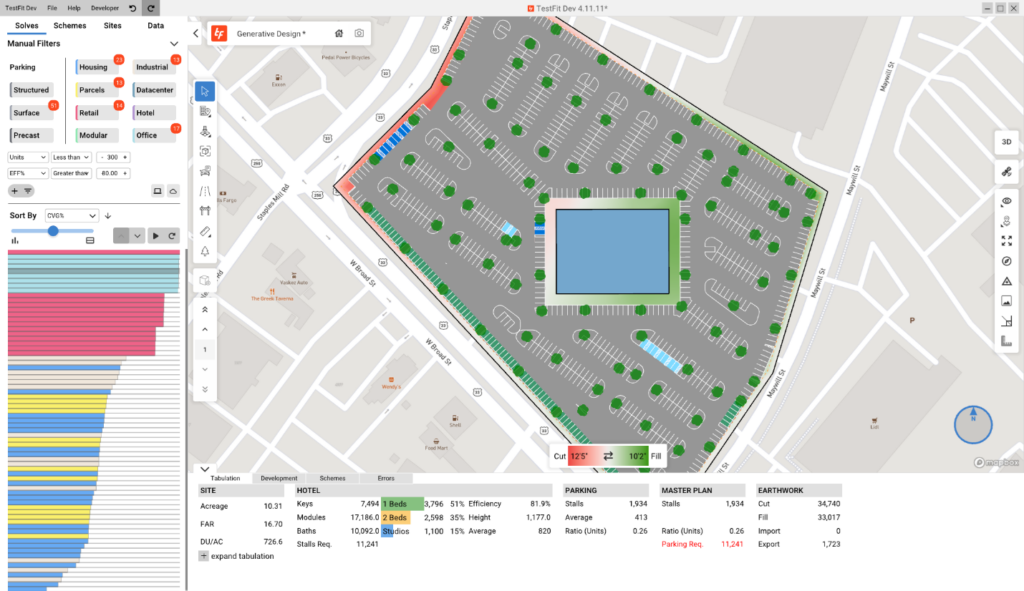
TestFit's automated site feasibility interface, via engineering.com
AI Tools · FeasibilityFrom $195/mo (Parking Solver)
Turns hours of manual parking and unit-mix iteration into minutes, with instant site feasibility, automated unit mix and real-time financial pro forma. Your expensive people stop spending days on dead sites, and the fee you save either becomes margin or becomes time to design better on the sites that survive.
View review & pricing →
Option Generation
More Design for the Same Fee
A classic production trap: you test three layout options, pick the least-bad one, and defend it for the rest of the project because testing a fourth wasn't in the budget.
The generative tools attack exactly that. Maket ($100/mo) generates residential floor plans from a written brief. Finch 3D (€79/mo) regenerates plans with live performance metrics inside Rhino, Grasshopper, and Revit as you adjust massing. ArkDesign handles code-aware multifamily layouts on lots that break generic tools. Hypar ($100/user/mo, Professional plan) extends this to structure and MEP logic, with direct Revit export.
The economics: what used to be a slow, manual round of option testing becomes a much faster iteration cycle. You're not paying for the software to be clever — you're paying for the option you wouldn't otherwise have been able to afford testing. And the honest caveat from our full write-up still applies: garbage brief in, garbage options out, just more of them. The constraints have to come from you.
AI Tools · Design$100/mo (Pro plan)
Generates residential floor plans from a written brief, with rapid design iteration and editable, code-aware layouts — entirely browser-based, no install.
View review & pricing →
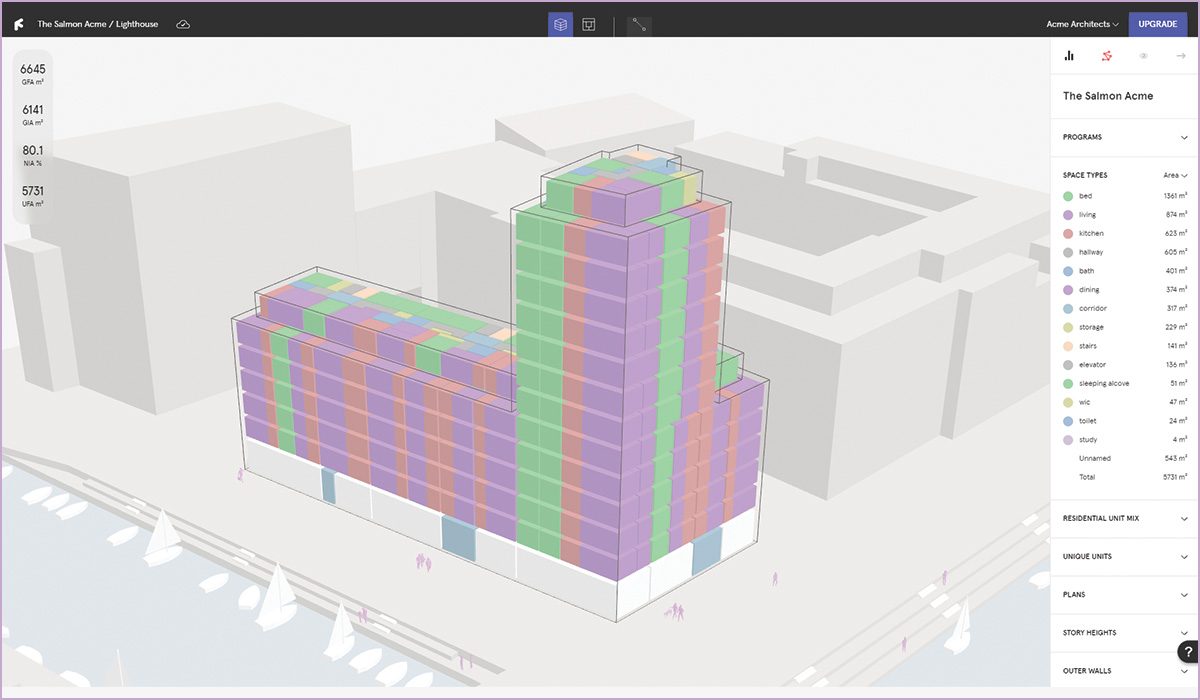
Finch 3D's generative floor plan output, via mgsarchitecture.in
AI Tools · Design€79/mo (Basic, billed monthly)
Generative-design plugin for Rhino, Grasshopper and Revit that regenerates plans with live performance metrics as you adjust massing.
View review & pricing →

An ArkDesign AI design output example, from arkdesign.ai
AI Tools · DesignFree (Lite); $180/mo (Pro)
AI platform generating code-aware floor plans and feasibility reports for multifamily housing — handles layouts on lots that break generic tools.
View review & pricing →
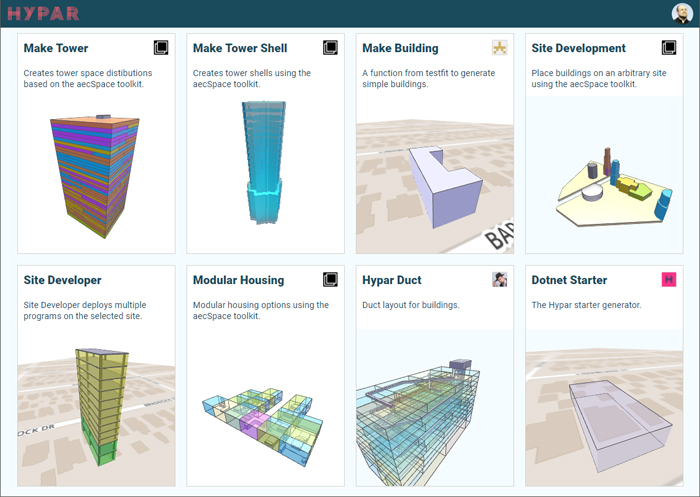
Hypar's space-planning options interface, via aecplustech.com
AI Tools · Design$100/user/mo (Professional)
Extends option generation to structure and MEP logic, generating and comparing layout options with automatic clearance checking, then handing off to Revit via direct export.
View review & pricing →
2D-to-BIM
The 2D-to-BIM Bottleneck: Where Weeks Actually Disappear
If you've ever had to model an existing building from a stack of old 2D drawings, you know this is the single worst job in the office — days or weeks of tracing walls for zero design credit.
WiseBIM AI ($49/mo) is a Revit add-in that detects walls, doors, windows, and slabs from an imported DWG, DXF, PDF, or even just an image, and generates the Revit geometry automatically. For renovation and adaptive-reuse work — a growing share of the market — this is the difference between quoting a survey-and-model phase in weeks versus accepting it as an unavoidable cost.
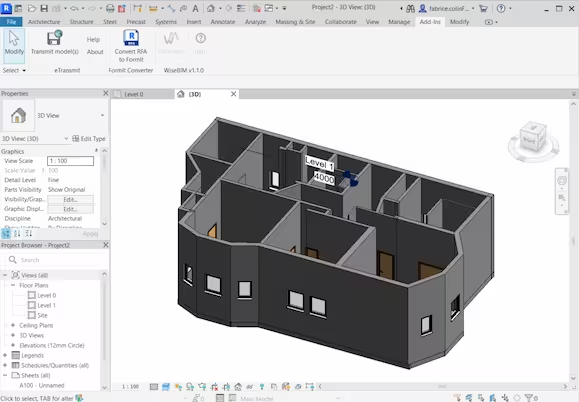
WiseBIM AI's 2D-to-3D conversion result shown inside Revit, from wisebim.app
AI Tools · BIM$49/mo
A Revit add-in that detects walls, doors, windows and slabs from an imported DWG, DXF, PDF, or even just an image, and generates the Revit geometry automatically.
View review & pricing →
Documentation
The Silent Fee-Eater
The least glamorous item on this list is arguably the highest-value one. Construction documentation and dimensioning eat a disproportionate share of every fee, and they're pure production: repetitive, rule-driven, and exactly the kind of work where human effort doesn't add design quality — it just adds hours and error risk.
Swapp is an agentic AI that works inside an existing Revit or Archicad model and automates the documentation and dimensioning. The pitch isn't "better drawings." It's the same drawings, in a fraction of the production time, with the team's attention pointed back at design. On a fee structure where CDs are a fixed-price line item, that difference lands directly on the bottom line.
SWAPP's AI automated-dimensioning interface for BIM documentation, from swapp.ai
AI Tools · DocumentationContact Sales
An agentic AI that works inside an existing Revit or Archicad model and automates the documentation and dimensioning — the same drawings, in a fraction of the production time.
View review & pricing →
Rendering
Renders Without the Render Pipeline
Traditional visualization economics: outsource it and wait on someone else's production cycle, or do it in-house and pay for the pipeline, the hardware, and the specialist's time.
The AI rendering category has quietly broken that trade-off:
- MyArchitectAI ($29/mo) — CAD export or sketch to photoreal render, in seconds, in the browser. No GPU rig, no scene setup, and you can mask and swap materials without a full re-render.
- Veras ($29/mo) — generates visuals directly from your CAD/BIM model via text prompts, with a slider controlling how much liberty the AI takes with your actual geometry.
- LookX — styled concept visuals from rough sketches, for fast mood exploration.
- D5 Render ($30/mo) — a full real-time engine with 15+ AI features, and a genuinely usable free Community plan.
- Magnific ($14.50/mo) — not a renderer but a finisher: it upscales and sharpens a render you already have.
And Midjourney ($10/mo) is still the cheapest alignment tool in the business: a material palette and a mood the client actually agrees to, before anyone spends production time modeling the wrong building. A lot of redesign rounds are really miscommunication rounds — that's a production cost too, and it's the cheapest one to eliminate.

MyArchitectAI's texture-editing tool applied to a rendered exterior, from myarchitectai.com
AI Tools · Rendering$29/mo (Starter, billed monthly)
CAD export or sketch to photoreal render, in seconds, in the browser — no GPU rig, no scene setup, and you can mask and swap materials without a full re-render.
View review & pricing →
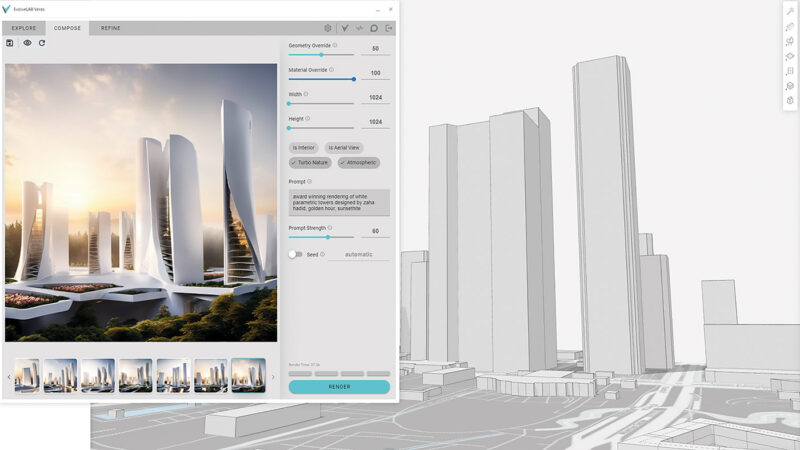
Veras' AI-rendering plugin interface, via aecmag.com
AI Tools · Rendering$29/mo (Named License, billed annually)
Generates visuals directly from your CAD/BIM model via text prompts, with a slider controlling how much liberty the AI takes with your actual geometry.
View review & pricing →
AI Tools · Rendering$20/mo (or $199/yr) after a free tier
AI-powered rendering that turns rough sketches into styled concept visuals, for fast mood exploration rather than a full photoreal render.
View review & pricing →
D5 Studio's cloud workspace rendering an architectural scene, from d5render.com
AI Tools · Rendering$30/mo (Pro, billed annually)
A full real-time ray-tracing engine with 15+ built-in AI-assisted features, and a genuinely usable free Community plan.
View review & pricing →

Magnific's AI creative platform tools interface, from magnific.com
AI Tools · Rendering$14.50/mo (Premium, billed annually)
AI upscaler (now part of Freepik) that sharpens textures, lighting and reflections on a render you already have — the finisher, not the render engine.
View review & pricing →
AI Tools · Rendering$10/mo (Basic, billed monthly)
Still the cheapest alignment tool in the business: a material palette and a mood the client actually agrees to, before anyone spends production time modeling the wrong building.
View review & pricing →
Common Questions
Building an AI Production Workflow
How much does a full AI production workflow actually cost per month?
A lean kit covering rendering, floor plan generation and 2D-to-BIM conversion — Midjourney, Spacio (free), MyArchitectAI, Magnific, WiseBIM AI and Maket — lands around $203/mo combined, roughly the price of a single Revit seat. Feasibility tools like TestFit and documentation tools like Swapp scale by project volume rather than per seat, so they're worth pricing separately against your actual pipeline.
Which stage of production sees the biggest AI production gains?
Feasibility. Design credit is never earned studying a site that was never going to pencil, so tools like TestFit and Archistar that rule a site in or out before design time gets spent on it tend to save the most billable hours per dollar of subscription cost.
Can AI floor plan generators like Maket replace an architect's design judgment?
No — every output still needs someone who understands code, structure and construction to sanity-check it. What changes is volume: testing a fourth or fifth layout option becomes affordable instead of a budget-breaker, but the constraints and the final call still have to come from the architect.
Is a 2D-to-BIM tool like WiseBIM AI worth it for renovation work?
For firms doing regular adaptive-reuse or renovation work, yes — tracing an existing building from a stack of old drawings is one of the most time-consuming, zero-design-credit tasks in the office. At $49/mo, WiseBIM AI's automated wall, door, window and slab detection from a DWG, DXF, PDF or image typically pays for itself on the first project.
None of these tools replaces an architect's judgment — every output still needs someone who understands code, structure, and construction to sanity-check it. The claim is narrower and, I think, more useful: the repetitive half of architectural production is getting dramatically cheaper and faster, and the tools doing it cost less per month than a billed hour.
Firms that figure this out first aren't buying better software. They're buying back their own time — and redeploying it on the parts of the project where an architect is still worth every billed hour.
Compare the AI tools discussed here
Verified pricing, full reviews and alternatives, side by side — that's what we built this site for.
Browse the AI Tools directory →
Pricing was verified directly on each vendor's own site in September 2026 and may change — always confirm current pricing before buying.